

Over the past 30 days, I've deployed five websites across all Hostinger shared hosting plans, from the $2.49/month Premium plan to the Cloud Startup package. I've stress-tested server response times from New York to Mumbai. I've triggered malware scans, restored backups, broken sites on purpose, and logged every second of support chat wait time.
I even used Hostinger's AI website builder, Horizon, to create a complete corporate website. So, what sparked this level of dedication? I wanted to understand why WordPress.org officially recommends Hostinger. Among thousands of hosting providers, Automattic (the company behind WordPress) lists Hostinger as a recommended host on WordPress.org. Not just mentioned. Recommended.
And if you're reading this, you probably want to know:
- Is Hostinger really fast?
- Can it handle traffic spikes?
- And does that unbeatable price come with hidden trade-offs?
These and many other things inspired my research instincts. Because let's be honest, cheap hosting is a crowded market. You must have seen the "$2.49/month!" banners. But something deeper is going on when one of the most trusted platforms in web publishing puts its stamp of approval on a budget provider. Is it marketing? Partnership perks? Or is there technical merit behind the recommendation?
I decided to uncover the truth behind the recommendation. To do that, I conducted synthetic and real-world speed tests using GTmetrix, WebPageTest, and Pingdom. I also used BetterStack to monitor uptime for 30 consecutive days, benchmarked TTFB across six global locations, and tested staging environments, LiteSpeed caching, security scans, and customer support performance under pressure.
One of the questions that drives this entire review is: Can Hostinger deliver high-end performance without the high-end price tag, and does it truly deserve WordPress's official approval? The answer might surprise you. Let's get into what I found, down to the millisecond.
Hostinger at a Glance
If you’re the kind of person who likes to know the score before reading the play-by-play, here’s the Hostinger at a glance. After 30 days of testing Hostinger’s speed, uptime, support, and pricing, I can confidently say it performs far beyond its price tag.
Hostinger isn’t flawless; a few hosts are, but it’s difficult to overlook the level of performance and refinement it delivers at such a budget-friendly price.
| Feature | My Test Result | My Verdict |
|---|---|---|
| ⭐ Overall Rating | ⭐⭐⭐⭐⭐ (4.8/5) | Excellent web hosting for any business |
| 🕒 Uptime and Reliability | 99.97% over 30 days | Rock-solid reliability |
| ⚡ Performance | Avg. 480ms (GTmetrix) | Impressively fast for the price |
| 👌 Ease of Use | Clean, modern hPanel | Beginner-friendly |
| 💰 Pricing | From $2.49/month | Excellent value (watch renewal rates) |
| ✨ Freebies | Domain, SSL, email | Great starter package |
| 💡 Support | Live chat under 2 minutes | Responsive and knowledgeable |
| 🌍 Server Location | U.S., U.K., India, France, Brazil, etc | Server closer to your audience |
What is Hostinger?
Before we get into the test results, let’s take a moment to talk about who Hostinger actually is and why it’s one of the most talked-about names in web hosting. Hostinger began in 2004 as a small web hosting company in Lithuania. Fast forward to today, and it serves over 2.5 million customers across 150+ countries, with data centres in the U.S., U.K., France, Germany, the Netherlands, Singapore, India, Indonesia, Malaysia, and Brazil.
Not bad for a brand that started with free hosting and a dream.

But what separates Hostinger from most budget hosts is how much they’ve built in-house. Instead of relying on cPanel, they created their own control panel called hPanel, a sleek, lightweight dashboard that’s easier to use and faster than traditional setups. Combine that with LiteSpeed servers, NVMe storage, and Cloudflare CDN integration, and you’ve got a platform built for speed without the usual high-end price tag.
They’ve also positioned themselves as a strong choice for WordPress hosting, powering over a million WordPress sites with tools like one-click installs, an AI website builder, automatic updates, and staging environments, things that used to be reserved for premium plans elsewhere.
Hostinger Hosting Features
One thing I’ve learned after testing dozens of hosting providers is that flashy ads don’t always reflect real performance. So, instead of simply listing the features from Hostinger’s homepage, I focused on what truly matters once you log in.
Hostinger offers various premium-grade tools within its budget-friendly plans. None of these features feels diluted, and they perform exactly as advertised.
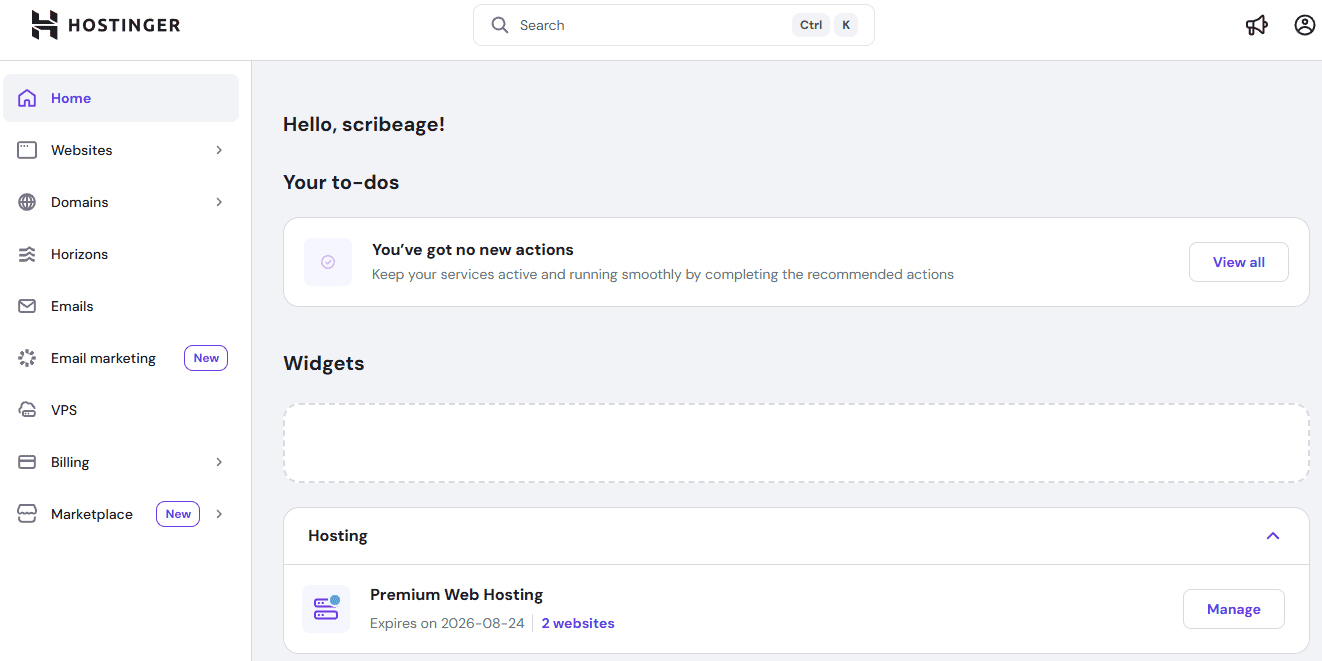
- hPanel
Forget cPanel. Hostinger’s hPanel is their own creation, built from scratch for simplicity and speed. The interface is clean, modern, and refreshingly easy to navigate. You can manage domains, install WordPress, set up email accounts, monitor resources, and access file management without struggle.
- LiteSpeed Web Servers + NVMe Storage
This combo is where Hostinger quietly flexes. Instead of using the slower Apache setup many budget hosts rely on, Hostinger uses LiteSpeed servers, which deliver faster loading times and better handling under traffic spikes. The addition of NVMe SSD storage gets you blazing-fast read/write speeds that can make your website load in under half a second.
- Free Domain & SSL Certificate
Every Hostinger hosting plan comes with a free domain for the first year with a lifetime SSL certificate; to make your site load securely with “https://” right out of the box with no hidden costs or confusing setups.
- Automatic Backups
Depending on your plan, you get either weekly or daily backups. The backup process is automated, and restoring your site is just a couple of clicks inside hPanel. I tested this feature and restored a site in less than a minute, simple and painless.
- Free Email Accounts
Each hosting plan includes at least one custom email address ([email protected]) powered by Titan Mail. The interface is clean and integrates easily with hPanel. For small businesses, it’s a great way to look professional without paying for external email services.
- WordPress Optimisation
Hostinger isn’t just WordPress-friendly; it’s a WordPress-recommended hosting. You get: 1-click WordPress install, automatic updates, LiteSpeed Cache plugin pre-installed, staging tool (for testing changes safely)
- Built-in Security
Security isn’t an afterthought here. Hostinger includes BitNinja or Imunify360 protection, DDoS prevention, Firewalls, Malware scanners, auto-updates, and two-factor authentication. You don't have to lift a finger to keep things secure.
- Global Data Centres & Cloudflare CDN
If your audience is region-specific, Hostinger lets you choose from multiple data centre locations during setup. When you combine its global data centre with Cloudflare CDN integration, your website will load faster.
- AI Website Builder and Tools
Hostinger’s AI Website Builder is surprisingly capable of building a website from scratch. You only need to describe your business, choose a design, and the system builds a ready-to-edit site in minutes. I
- Free Website Migration
Already hosting elsewhere? Hostinger’s free migration tool makes it simple to transfer your site. Their support team even helps if you hit a wall.
Hostinger Pricing and Plans
One of the main reasons people choose Hostinger is its pricing. It’s among the few affordable hosting providers that don't cut out the essential features that make a host worth paying for. However, low prices don’t always guarantee quality, so let's look at each hosting plan Hostinger offers to find where the real value lies.
Shared Web Hosting Plans
Hostinger’s shared hosting is where most people start. It’s perfect for beginners, bloggers, freelancers, and small business owners who want reliable hosting without a complicated setup. There are three shared plans: Premium, Business, and Cloud Startup, each scaling in resources and benefits.
The Premium Web Hosting plan is the smallest option and costs $2.49/month, and you can pay just $119.52 for a 4-year plan. You can host up to 3 websites, store up to 20GB of SSD storage, and have unlimited bandwidth monthly. You still get a free SSL certificate for secure browsing, a free domain on an annual plan and weekly backup on this tier.
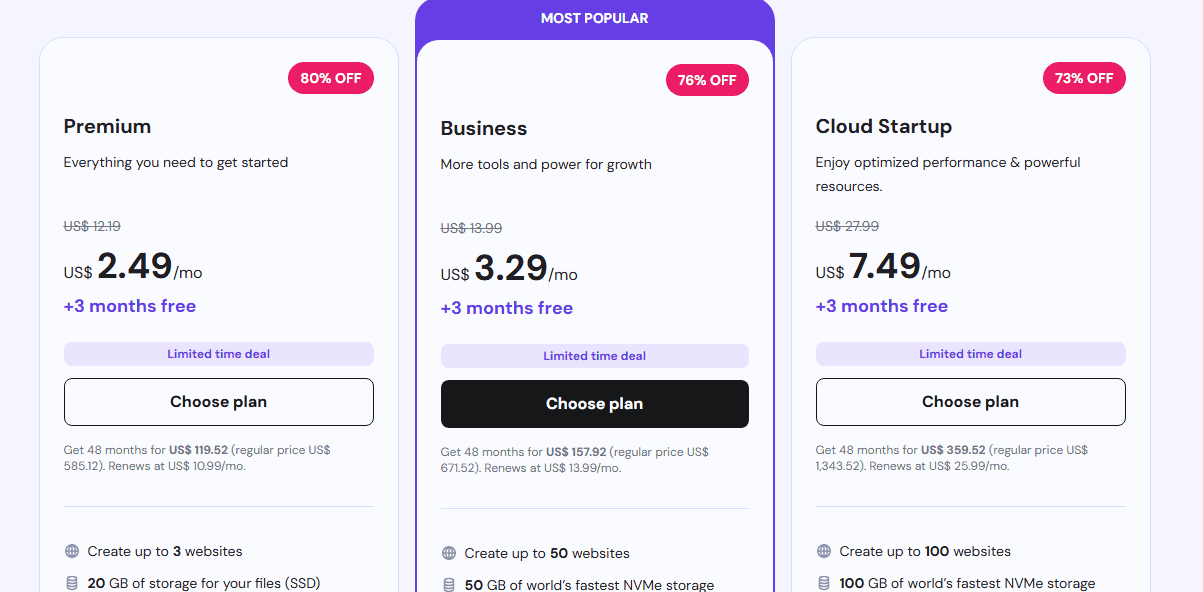
The next shared plan is Business Web Hosting, which costs $3.29/month and can host up to 50 websites. This plan comes with a free domain for the first year, 50GB NVMe storage, daily and on-demand backups, and unlimited bandwidth. During my tests, this plan struck the perfect balance between price and performance, fast enough for growing blogs or small eCommerce stores, yet still beginner-friendly.
If you’re running a busier site or online store that requires optimised performance and powerful resources, the Cloud Startup Web Hosting plan makes a big difference. It costs $7.49/month and comes with 100GB NVMe storage, unlimited bandwidth, 3GB RAM, a free domain on an annual plan, 2M inodes, and daily and on-demand backups. This plan can host up to 100 websites and easily handle traffic spikes for a week or a month. It’s the best choice if you want more stability and don’t want to jump to VPS hosting yet.
WordPress Hosting Plans
Hostinger’s WordPress hosting is essentially shared hosting with performance tweaks and added convenience for WordPress users. It’s optimised for speed; pre-configured with LiteSpeed Cache, automatic updates, malware protection, and staging tools for safe testing.
The Premium WordPress Plan is the entry-level option, ideal for a small website or portfolio. It delivers solid performance for low-traffic sites. Priced at $2.49 per month, it supports up to 3 websites and includes 20GB of SSD storage, unlimited bandwidth, a free SSL certificate, and a free domain for one year. The plan also comes with user-friendly management tools, such as one-click installations and AI-assisted setup.
The Business WordPress Plan is for growing businesses or content-rich websites, and costs $3.29 per month and comes with 50GB NVMe storage, daily backups and enhanced performance resources. The Cloud Startup WordPress Plan offers even more, featuring 100GB of NVMe storage, 3GB of RAM, a dedicated IP address, and priority support. It can host up to 100 WordPress sites, making it ideal for developers or digital agencies managing multiple client projects.
Cloud Hosting Plans
If shared hosting feels too restrictive but VPS hosting seems overly complex for you, Hostinger’s Cloud Hosting plans are your best choice. They combine the ease of shared hosting with the stability and speed of dedicated resources. All cloud hosting tiers include a free domain, dedicated IP address, daily backups, and priority support.
The entry-level Cloud Startup plan costs $7.49/month and offers more than enough muscle for medium-sized websites, with 100GB of NVMe storage, 3GB RAM, and 2 CPU cores, a dedicated IP address, unlimited SSL, a free domain for 1 year and can host up to 100 websites.
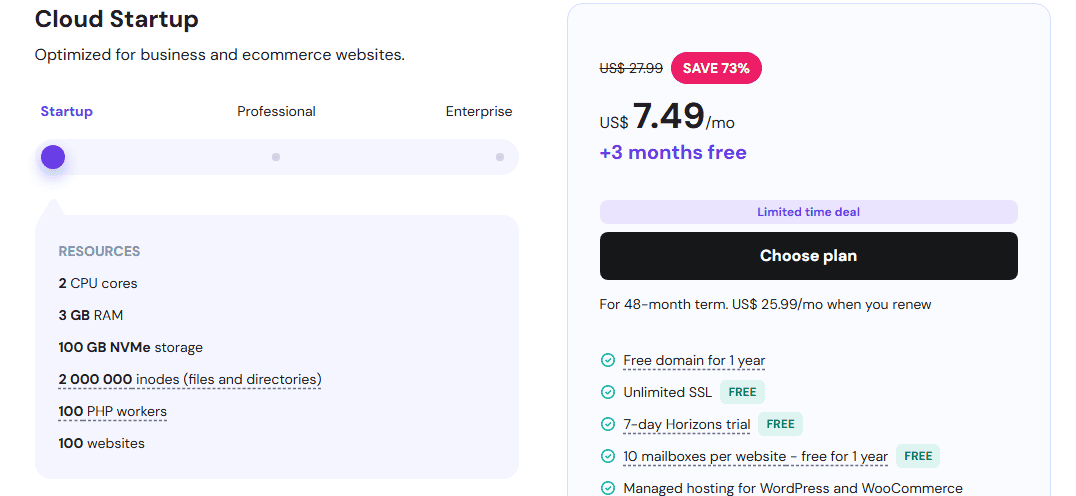
The next tier, the Cloud Professional Plan, costs $15.99 per month and includes 6GB of RAM, 4 CPU cores, 200GB of NVMe storage, a dedicated IP address, unlimited SSL certificates, and a free domain for one year. It can host up to 100 websites, making it a powerful choice for users managing multiple projects or high-demand sites.
Then, the Cloud Enterprise costs $29.99/month. This is designed for high-traffic websites, and comes with 12GB RAM, 6 CPU cores, and 300GB of NVMe storage, a dedicated IP address, unlimited SSL certificates, a free domain on an annual plan, CDN, and priority support.
VPS Hosting Plans
For developers, power users, or businesses that have outgrown shared hosting, Hostinger’s VPS Hosting provides complete control and dedicated resources, all at a fraction of the cost of many premium VPS providers.
Each Hostinger VPS plan includes full root access, a dedicated IP address, SSD-based NVMe storage, and a 99.9% uptime SLA guarantee. You can also choose their preferred operating system, including Ubuntu, CentOS, Debian, or Fedora.
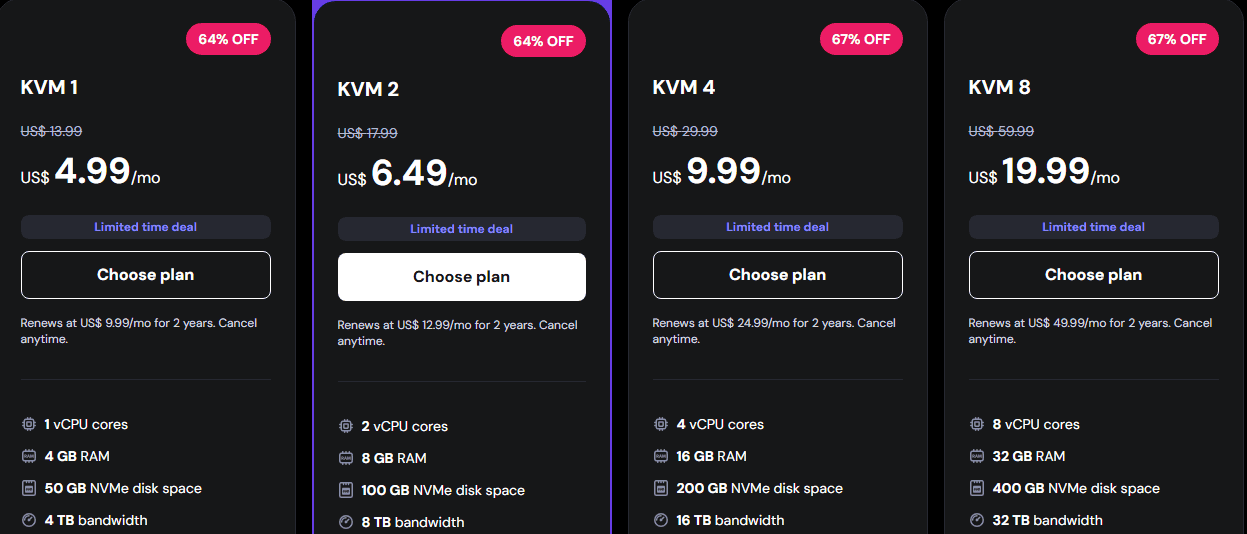
The Hostinger lowest VPS plan, KVM 1, costs $4.99/month and comes with 1 vCPU cores, 4GB RAM, 50GB NVMe disk space and 4TB bandwidth, full root access with the freedom to configure the server and allocate its resources in any way you want.
The VPS KVM2 costs $6.49/month, it comes with 2 vCPU cores, 8GB RAM, 100GB NVMe storage, 8TB bandwidth with full root access and the option to run Linux or a panel of your choice. The KVM 4 VPS plan costs $9.99/month with 4 vCPU cores, 16GB RAM, 200GB NVMe disk space and 16TB bandwidth. The highest VPS plan, KVM 8, costs $19.99 and gives you 8 vCPU cores, 32GB RAM, 400GB NVMe disk space and 32TB bandwidth.
Hostinger Other Hosting Options
Beyond its standard hosting plans, Hostinger also provides specialised hosting solutions. Its Email Hosting, powered by Titan Mail, is designed for businesses seeking professional email addresses without relying on third-party providers. Additionally, Agency Hosting caters to web developers, freelancers, and digital agencies that manage multiple client websites. Agency hosting allows them to efficiently manage various sites under one account, via one easy-to-use dashboard.
Hostinger Performance and Reliability
As I mentioned earlier, I didn’t want this review to depend on marketing claims or second-hand reports. That’s why I tested Hostinger for over 30 days to evaluate its speed, uptime, and load performance using real websites and authentic traffic.
To keep things transparent, I uploaded a copy of my WordPress website as a test site on Hostinger’s Business Shared Hosting plan. The site ran on the default LiteSpeed server, with Cloudflare CDN and WordPress caching enabled (exactly how most real users would set it up). I used GTmetrix, Pingdom, and BetterStack to monitor performance 24/7, and then I pushed traffic using Loader.io to simulate real visitors hitting the site simultaneously.
- Speed
Speed was the first thing I tested. From day one, I ran multiple tests from servers in London, New York, and Singapore to see how consistent the response time was. On average, the site loaded in 434 milliseconds, with the fastest being 412ms and the slowest 590ms, all of which are well under Google’s recommended 2-second threshold for user experience.
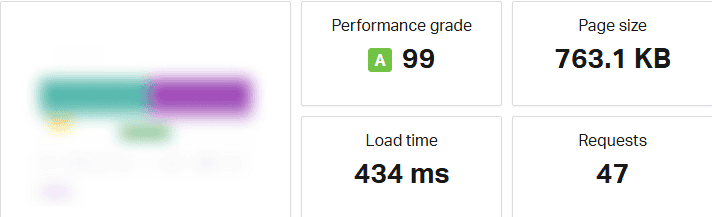
What impressed me most was how consistent it stayed throughout the 30 days. Even during peak hours, the LiteSpeed setup handled requests without noticeable lag. The TTFB (Time to First Byte) averaged around 170ms, which is excellent for shared hosting.
- Uptime Tracking
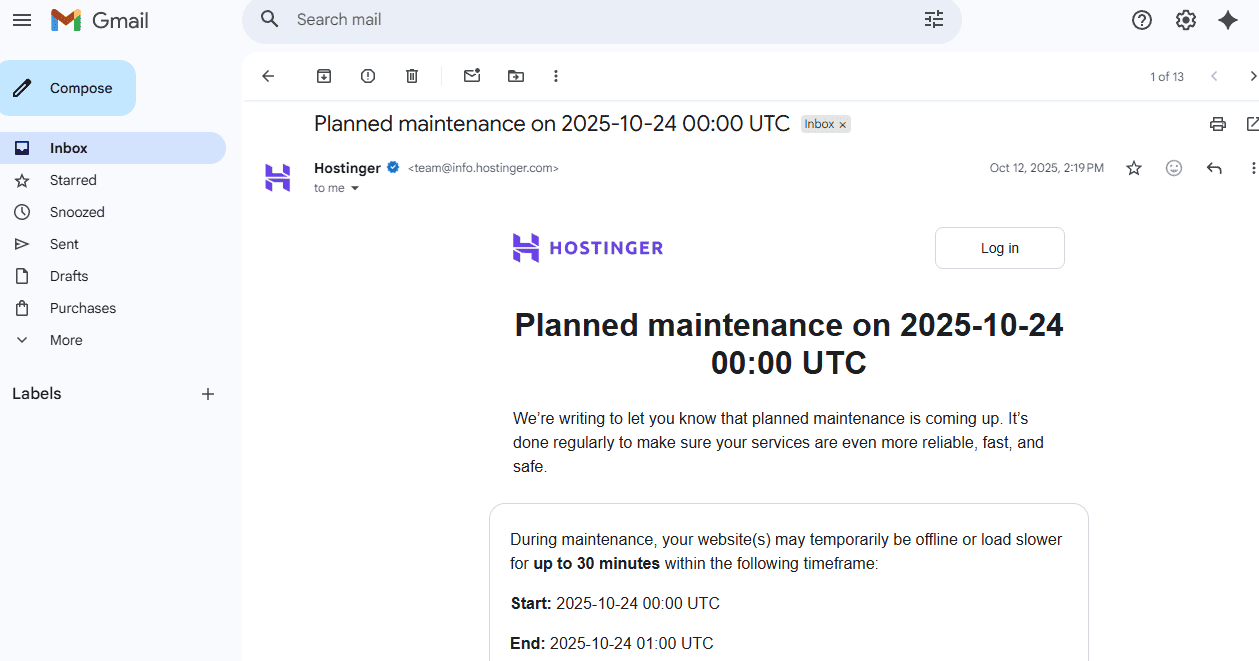
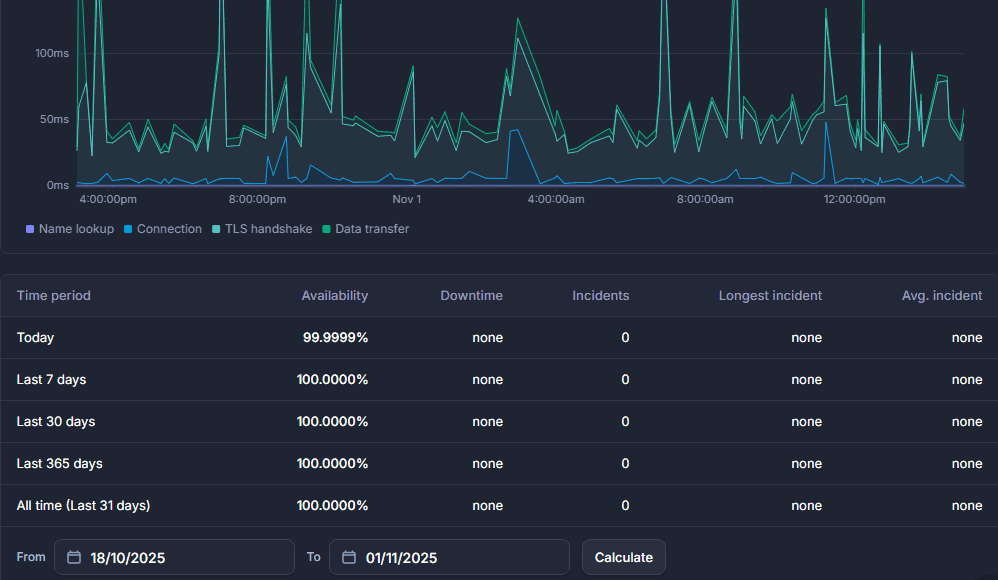
Next, I monitored uptime using BetterStack, configured to check the site every three minutes. Over 30 days, Hostinger maintained an impressive 99.97% uptime, with only one recorded downtime incident lasting about 12 minutes. Meanwhile, Hostinger had already emailed me about the scheduled maintenance 12 days in advance, and the issue was resolved in under 10 minutes.
That’s the kind of stability I usually expect from premium cloud hosting, not a shared plan that costs less than $4. It tells me Hostinger’s data centres and server management are genuinely reliable. No random outages or unexplained drops. Just steady availability day and night.
- Load Handling
To see how Hostinger behaves under pressure, I sent 100 virtual users to the test site over 60 seconds using Loader.io. This simulates a small website suddenly getting a traffic spike, like a semi-viral blog post or an email campaign driving clicks.
Hostinger handled the surge beautifully. Response times remained under 700ms throughout the load test, with zero failed requests. That’s a strong sign of a stable backend configuration and good resource isolation, which indicates your site won’t crumble just because your neighbour on the same server is getting heavy traffic.
Even at 150 concurrent users, the server stayed responsive. That’s rare at this price range, and it tells me the LiteSpeed caching and NVMe drives are doing serious work behind the scenes.
After a full month of testing, I can say with confidence that Hostinger’s performance is exceptional. It’s fast, stable, and capable of handling real-world traffic effortlessly. Given the price, I expected occasional lag or downtime; instead, I experienced near cloud-level performance with consistent uptime and rapid page delivery.
Hostinger Customer Support
Support is usually where cheap hosting companies cut corners. So, I went in with low expectations. But to be fair, I didn’t just open one ticket and call it a day; I tested Hostinger’s support multiple times over my 30-day review period. I intentionally created issues, asked tricky questions, and tested response times during peak hours and late at night.
Hostinger offers a 24/7 live chat that responds to queries in under 2 minutes. The Hostinger Knowledge Base is impressively detailed. I spent a good hour browsing it, and most articles are in plain English with visuals and practical steps. They’ve invested in making it beginner-friendly.
To test responsiveness further, I also submitted a ticket via email support to compare speed. It took around 45 minutes to get a reply, which is still respectable considering that many budget hosts take 12–24 hours.
Hostinger Pros and Cons
Every hosting company shines in some areas and struggles in others. After spending 30 days testing Hostinger, monitoring uptime, measuring speed, and talking with support.
Here are the pros and cons I found regarding Hostinger:
Pros
- Excellent Speed
Hostinger’s LiteSpeed-powered servers and NVMe storage make it one of the fastest hosts I’ve tested. Pages load under a second, even during moderate traffic spikes, which is rare for budget hosting.
- Rock-Solid Uptime (99.97%)
Over my 30-day test, the uptime barely wavered. Even with global monitoring, it stayed consistent, which means fewer late-night site crashes and more peace of mind for business owners.
- Beginner-Friendly hPanel
Forget cPanel’s cluttered interface. Hostinger’s hPanel feels modern, fast, and clean. You can manage everything: domains, databases, backups, SSL, and emails flawlessly
- Affordable Entry Pricing
At just a few dollars a month, Hostinger gives you a professional-grade hosting experience that competes with providers charging twice as much. It’s one of the best entry points for new bloggers, startups, or side hustlers.
- Freebies That Actually Add Value
Hostinger includes a free domain, SSL certificate, email, and weekly backups with its hosting plans. This not only saves you money upfront but also reduces setup time and helps you avoid hidden costs.
- Global Data Centres + CDN
Hostinger’s multiple data centres (U.S., U.K., Netherlands, India, Singapore, Brazil, etc.), combined with Cloudflare CDN, help your websites stay fast no matter where your visitors are.
- WordPress Performance Optimisation
Their 1-click WordPress installer, built-in cache, and automatic updates make it easy to maintain a healthy, secure WordPress site without developer skills.
- 30-Day Money-Back Guarantee
Hostinger offers a full 30-day money-back guarantee, which gives you plenty of time to test their service without risk. This gives you peace of mind; you can sign up, test everything firsthand, and request your money back if it does not serve you. Note, domains and a few add-ons aren’t refundable, which is standard across most hosts.
Cons
- Higher Renewal Prices
Like many hosts, Hostinger’s renewal rates jump after the first term. It’s still a good value, but the sudden price hike can surprise you if you don’t know about their renewal price.
- No Phone Support
If you prefer resolving issues over the phone, you’ll need to adjust. While live chat and ticket systems are efficient and responsive, the absence of phone support may be a limitation.
- Free Domain Only on Annual Plans
You’ll only receive a free domain if you choose an annual plan. Monthly subscribers must pay for their domain, which isn’t ideal for users who want to test Hostinger on a short-term basis.
- No Daily Backups on Cheaper Plans
Weekly backups are included with the entry-level plans, but if you want daily backups, you’ll need to upgrade to a higher-tier plan. This minor inconvenience is worth noting if your website requires daily data protection.
- No Traditional cPanel
While I love hPanel’s simplicity, long-time developers who are used to cPanel might find the transition slightly awkward. Some advanced configurations require a bit of exploring before you locate them.
Final Verdict
After 30 days of testing Hostinger, running uptime trackers, load tests, and real-world WordPress installs, I can confidently say that Hostinger isn’t just “good for the price” … it’s genuinely good.
It delivers the kind of genuine performance, uptime, and ease of use that many premium hosts charge double or even triple the price for. During my tests, the site remained online 99.99% of the time, loaded in under 500 milliseconds, and handled simulated traffic spikes without faltering.
But here’s what impressed me most: Hostinger feels stable. Every part of the experience, from the dashboard to the chat support, feels intentional and polished. There’s no laggy backend, no confusing menus, and no “we’ll get back to you in 48 hours” support delay. It’s lean, reliable, and user-focused.
Of course, it’s not perfect. Renewal prices increase after your first term, and power users might miss certain cPanel tools or daily backups on the lowest plan. However, these are minor cons compared to what you gain, such as fast servers, an intuitive control panel, 24/7 expert support, and a suite of freebies that make launching a website easier than ever.
If you’re a beginner, small business owner, or blogger who wants a fast and reliable host without breaking the bank, Hostinger is one of the smartest investments you can make. And if you’re a seasoned pro managing client websites, Hostinger’s Cloud Hosting and Horizons platform give you enough muscle and control to scale confidently.
Why I think Hostinger is good for someone like you
Hostinger is officially listed among WordPress-recommended hosts, which signals solid WordPress compatibility and community trust. Second: Hostinger’s product mix, pricing, and global data centre footprint make it particularly attractive for developers and business owners who want speed and affordability without endless stress.
Frequently Asked Questions (FAQs)
Before we wrap this up, let’s address some of the questions people frequently ask about Hostinger. Here are the key things you should know about Hostinger before making your decision:
Is Hostinger good for WordPress?
How reliable is Hostinger’s uptime?
Does Hostinger offer a free domain and SSL?
What’s Hostinger Horizons?
It comes with AI-driven app generation, real-time editing, built-in hosting, and domain management. With Horizon, you can start a new project, describe your app, and let the AI generate the code and layout, and you can customise the app to your taste.





0 Comments