


Spaceship has been floating around among hosting discussions for a while. Some users praise it for the pricing, while others mention that it feels smoother than many budget hosts in the market.
As someone who’s launched more websites than I can remember, I put Spaceship Hosting to the test. I deployed a live website, pushed traffic through it, tracked uptime, measured real-world speed, tested the control panel, poked at security settings, and dealt with support when things didn’t go as planned and even dug into their DNS setup. Yes, I’m that curious.
In this review, Ibreak down what you really get once the marketing ends: performance numbers you can verify, usability details most reviews skip, pricing that looks cheap until renewal day, and the trade-offs that matter depending on the type of site you’re running.
If you’re a blogger, solopreneur, or scaling startup tired of hosting that crashes faster than a crypto meme coin, or wondering whether Spaceship Hosting is genuinely reliable, fast enough for real traffic, and worth choosing over better-known hosting providers, this review will give you a clear, data-backed answer.
Spaceship Quick Overview
I tested Spaceship by hosting a real WordPress site, running page speed checks, monitoring uptime, and contacting support at different hours. Spaceship hosting is a solid, low-cost hosting provider that delivers strong performance and a smooth, intuitive dashboard, especially if you also manage your domains with them. However, support response times and a few missing advanced hosting options could matter for growing or high-traffic websites.
It’s a strong, affordable hosting option for blogs, business websites, personal brand sites, and small SaaS projects. However, if you plan to scale to thousands of daily visitors, you may need more than their shared hosting plan.
| Feature | Rating | Details |
|---|---|---|
| ⚡ Performance | ⭐⭐⭐⭐☆ (4.8/5) | Pages load quickly, especially on lightweight WordPress setups. |
| 🕒 Uptime and Reliability | ⭐⭐⭐⭐⭐ (4.9/5) | 99.99% uptime with no downtime |
| 💼 Hosting Types | ⭐⭐⭐⭐(4/5) | Shared, WordPress, VPS, and Cloud hosting |
| 👌 Ease of Use | ⭐⭐⭐⭐☆ (4.7/5) | Simple setup and clean control panel, beginner-friendly. |
| 🔒 Security | ⭐⭐⭐⭐☆ (4.8/5) | SSL, DNSSEC, Virus/malware and Firewall protection |
| 💰 Pricing Value | ⭐⭐⭐⭐⭐ (5/5) | Low entry cost with useful features included from day one. |
| 💡 Customer Support | ⭐⭐⭐⭐(4/5) | Helpful replies, but response time isn’t always instant. |
| 🌍 Server Location | ⭐⭐⭐⭐(4/5) | US, Singapore, EU, UK |
What is Spaceship Hosting?
Spaceship Hosting is a web hosting service built with simplicity, speed, and tight domain integration in mind. It is closely associated with the Namecheap ecosystem, which already powers millions of domains worldwide. The idea behind Spaceship is to give site owners a clean hosting platform that removes clutter, trims unnecessary extras, and keeps pricing easy to understand.
At its core, Spaceship Hosting focuses on shared hosting, WordPress-friendly setups, VPS and Cloud hosting. Suitable for bloggers, small business owners, startups, and anyone who wants to launch a website without complex server settings. You don't need to manage servers, configure stacks, or install advanced tools. They handle most of the heavy lifting behind the scenes.
One thing that sets Spaceship Hosting apart is how seamlessly hosting, domains, DNS, and essential site tools are parked into a single dashboard. Instead of jumping between multiple platforms, you manage everything from a single interface. For users who register and manage many domains, this setup saves time and reduces friction.
Spaceship Hosting is not trying to compete with high-end cloud hosting or enterprise platforms. Instead, it targets users who want stable performance, predictable pricing, and a hosting experience that feels clean and modern rather than bloated.
Spaceship Hosting Key Features
Most web hosting features look impressive on sales pages, but what really matters is how they work in setting up a site, managing domains, handling updates, and keeping everything running smoothly.
Here is what Spaceship Hosting is built to do:
- All-in-One Dashboard
Spaceship Hosting runs on an all-in-one infrastructure designed for speed and simplicity. One panel handles domain registration, web hosting, email and settings; you don’t have to bounce between separate systems for each. An optimised dashboard that delivers reliable response times for all your website's needs.
- Easy Domain and DNS Management
Since Spaceship Hosting is part of the Namecheap ecosystem, domains, DNS records, and hosting are tied together in a single dashboard. You don't need to jump between platforms to manage domain settings, update nameservers, or configure DNS records.
- WordPress Integration
Spaceship Hosting offers one-click WordPress installation and basic WordPress management tools. This includes auto-installation, default caching settings, and dashboards designed to let even beginners launch WordPress sites without dealing with plugins or manual database setup.
- Performance Tools and Caching
To keep page load times competitive, Spaceship Hosting includes built-in caching at the server level. This means static content is served faster without relying solely on plugins. You also have access to a content delivery network (CDN) to improve resource delivery globally.
- Backups and Restore Options
Backups are a critical part of hosting reliability. Spaceship Hosting includes automated backups that run on a regular schedule, depending on the plan. You can restore sites to a previous state in case of errors, misconfigurations, or hacks.
- Security Features
Security protections are essential for hosting stability. Spaceship Hosting includes built-in free SSL certificates, DNSSEC authentication, DNS DDoS prevention, Free domain privacy, Suspicious login monitoring, Virus and malware monitoring, and automated malware scanning.
- Uptime Monitoring
Spaceship Hosting offers 99.99% solid uptime through redundant infrastructure and regular monitoring. The 99.99% uptime beats the industry standard, and your website may experience downtime for just 4 minutes in a month.
- Email Hosting
All Spaceship Hosting plans allow you to create email addresses that match your brand name. You can set up professional email addresses (e.g., [email protected]) and manage them through the dashboard or Spacemail.
- Free Website Migration
Switching web hosts can be nerve-wracking, with broken links, downtime, endless email threads, you name it. But with the Spaceship Unbox tool, you can migrate your entire cPanel backup file into Spaceship hosting with no special skills needed.
Spaceship Uptime and Performance
I did not rely on marketing claims or single-day snapshots for this review. I created a new Pro hosting account, deployed a live website, and continuously monitored its performance for 30 days.
During this period, I tracked speed, uptime, and server response under both normal usage and simulated traffic spikes using Loader.io, GTmetrix, Pingdom, and UptimeRobot. Every result below is based on direct testing.
This is how Spaceship Hosting behaves over 30 days of testing.
- Speed
I ran speed tests multiple times per week using standard performance tools and browser-based testing. For performance testing, I focused on two core metrics that reveal how a hosting server behaves under real-world conditions: time to first byte (TTFB), which measures how quickly the server responds to a request, and full page load time, which shows how long it takes for a complete page to load for a visitor.
The initial server response was consistently quick during low and moderate traffic, full page load times stayed stable even after repeated tests, and Performance did not degrade after days of uptime. When I pushed traffic to the site in short bursts, I noticed slight slowdowns, which is expected on shared hosting. However, the site remained usable and did not time out or crash during these tests.

Under normal conditions, the speed remains constant, and the load time is 221 ms. But when I simulated concurrent visitors hitting the site within short intervals to see if Spaceship Hosting could handle real pressure instead of ideal conditions. The site stayed online throughout the traffic bursts, with a slight increase in page load times.
- Uptime
I monitored the site uptime throughout the 30-day testing period. I did not restart services, contact support for resets, or intervene unless something broke. Spaceship Hosting delivered 100% uptime throughout the entire month, meaning the site remained online without interruption. That’s almost perfect and beats the standard for any shared hosting.
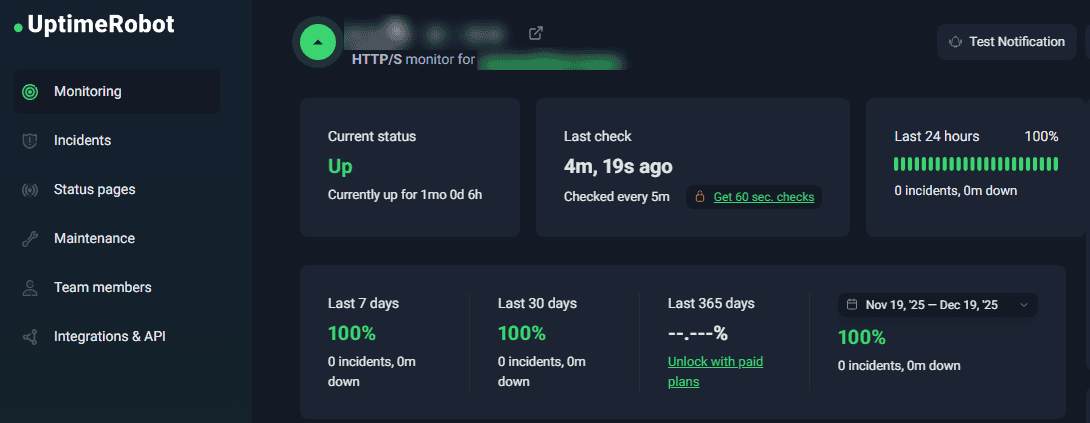
From a practical standpoint, this level of uptime is what most site owners expect when running content sites, landing pages, or business websites.
- Server Consistency
One detail many reviews miss is performance consistency. I paid close attention to how the server behaved after weeks of use, not just at launch. What stood out is that the performance on day 25 looked similar to day 3, no slow creep in response time and no unexplained resource throttling. This consistency matters because many shared hosting providers perform well at first but then decline. That did not happen during my testing period.
- Overall Performance
Based on 30 days of hands-on testing, I would describe Spaceship Hosting’s performance as stable, predictable, and suitable for its target audience. It handles everyday workloads reliably when put under real use. I treated it like a real production site, pushed traffic through it and monitored how it behaved over time. The results were consistent enough to move forward with confidence, provided you choose it for the right type of project.
Spaceship Shared Hosting Plans & Pricing
When you’re choosing a host, pricing isn’t just about the sticker price; it’s about what you actually get for that money and how that cost stacks up when it renews. I took a close look at Spaceship’s shared hosting lineup and broke down the differences below.
Spaceship shared hosting Essential plan is the entry-level plan that costs just $1.66/month after the initial 30-day free trial. The plan comes with 1 core CPU, 20GB SSD Cloud storage, free SSL certificates, Imunify360 protection, SSI, SSH, and you can host up to 5 websites. This plan is good for you if you host small websites that require minimal resources.
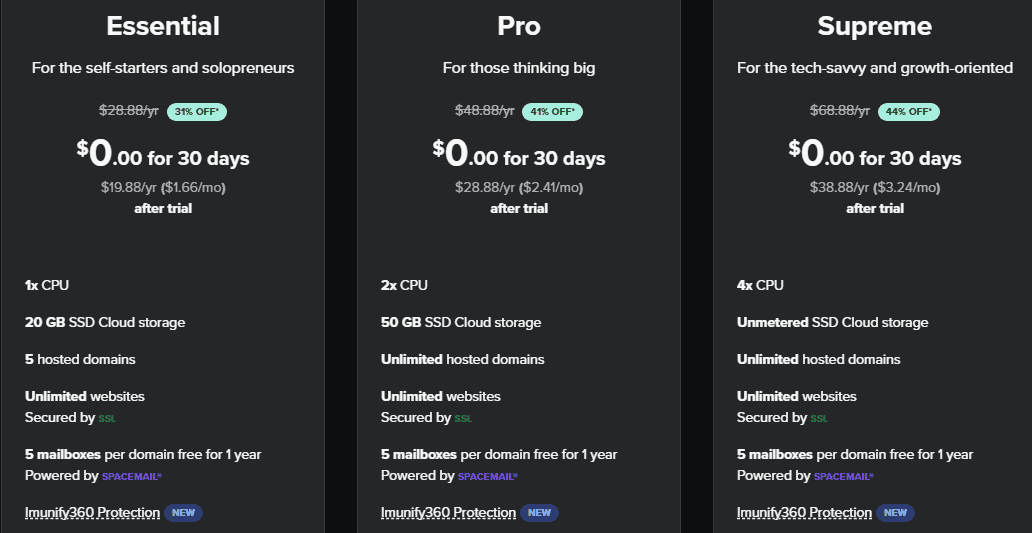
The next plan is the Pro plan that costs $2.41/month after the initial 30-day trial. With the Pro plan, you will enjoy 2 core CPUs, 50GB SSD Cloud storage, WordPress AI tool, free SSL certificates, Imunify360 protection, SSI, SSH, and host unlimited websites.
The Supreme plan is the highest Spaceship shared hosting plan; it costs $3.24/month after the initial free 30-day trial. This plan comes with 4 CPU cores, unmetered SSD cloud storage, a WordPress AI tool, free SSL certificates, Imunify360 protection, SSI, and SSH, with the ability to host unlimited websites.
Spaceship shared hosting plans are budget-friendly, especially for new websites. The entry plan is suitable for beginners, bloggers, and small business owners who want to get online without a large upfront commitment.
Spaceship Other Web Hosting Products
Spaceship Hosting’s shared hosting plans work great for bloggers, startups, and small businesses. But that’s just the starting point.
If you run sites that require advanced tools or traffic, Spaceship offers stronger options, such as managed WordPress hosting, VPS machines, and enterprise-level hyperlift cloud hosting to build and deploy your code from GitHub without complex configuration or DevOps.
These plans give you more power, better control, and room to scale, perfect for high-traffic websites, client projects, or business-critical applications.
Spaceship Managed Hosting
If you’re a WordPress user, you will enjoy Spaceship EasyWP managed WordPress hosting. With Spaceship Managed WordPress hosting, you can install WordPress websites without cPanel using Spaceship's custom EasyWP panel and go live in under 15 seconds.
The managed WordPress hosting plan starts at $2.40/month when you pay for an annual plan. The EasyWP panel is a user-friendly dashboard that makes installing and managing your WordPress website a breeze, plus updates and security are handled for you.
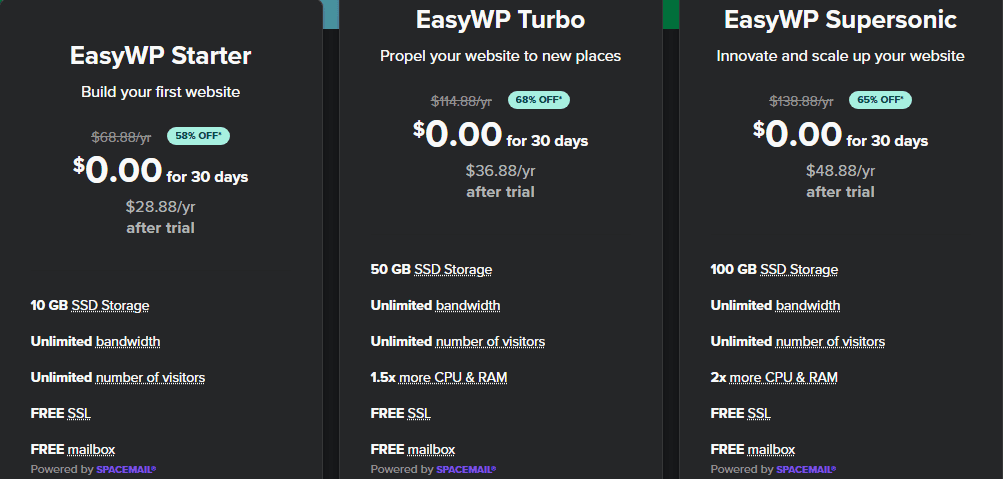
All Spaceship Managed WordPress hosting comes with the EasyWP panel. This is their custom-built dashboard made specifically for WordPress hosting. I tested it side by side with cPanel, and honestly, EasyWP is refreshingly simple. No installers required, no zip files, no manual uploads. You click “Create WordPress Site,” pick your domain, and in under 20 seconds, your website is live.
All Spaceship Managed WordPress plans include unlimited bandwidth, free PositiveSSL, HackGuardian, MalwareGuardian, WordPress auto-login, NVMe-powered storage, 99.99% uptime, and the flexibility to upgrade or downgrade at any time.
Spaceship VPS Hosting
Spaceship Hosting also offers Next-gen Virtual Machines hosting for users who require performance and scalability for web applications that need higher performance.
The Spaceship Virtual Machine comes in both prepaid and pay-as-you-go payment plans. The prepaid plan entry-level costs $42.44/year after the initial 7-day free trial. The standard plan comes with 1 core CPU, 2GB RAM, 25GB NVMe SSD, and 1TB bandwidth.
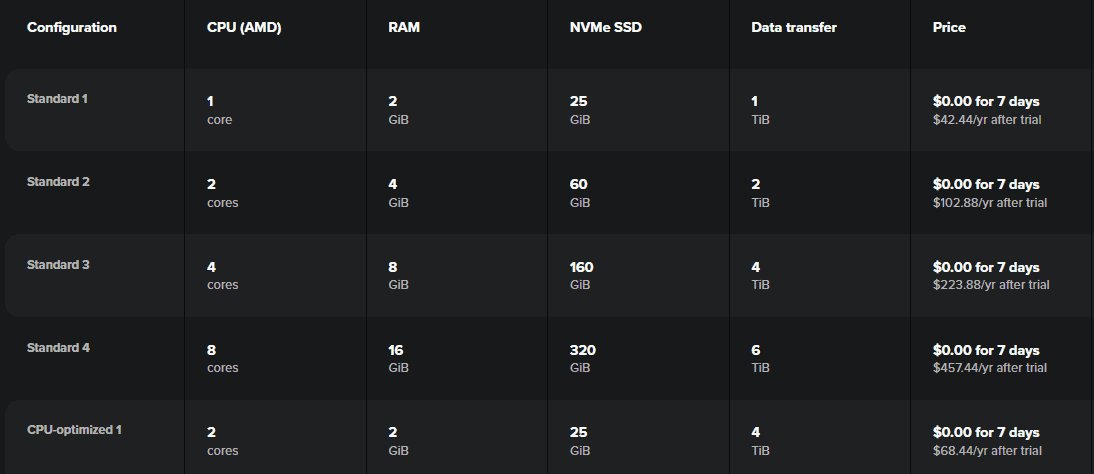
Spaceship Starlight VPS hosting plans give you the flexibility of a dedicated server, but at a lower cost. You get guaranteed resources, fast NVMe SSD storage, and full root access to configure your server the way you like, using any operating system of your choice.
Spaceship Cloud’s Starlight Hyperlift
One thing that sets Spaceship apart from other web hosting companies is its modern deployment platform that lets you build, deploy, and host containerised applications, APIs, and websites without managing servers or infrastructure. Hyperlift is designed to make cloud deployment accessible and efficient for developers, startups, and any project.
Spaceship cloud hosting called Hyperlift is a fully managed deployment engine built for real-world applications and production-ready workloads. Unlike traditional cloud hosts, where you configure virtual machines, networking, and clusters, Hyperlift automates the entire workflow from code to live deployment. Hyperlift isn’t limited to one language or framework. Anything containerisable, from Node.js and Python to Java and Go, can be deployed as long as a Dockerfile is provided.
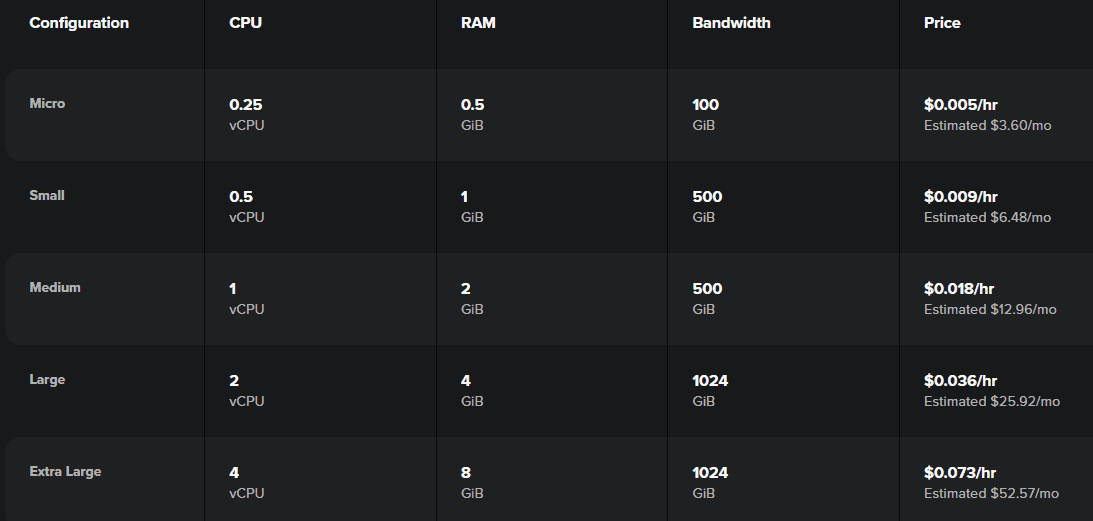
It connects directly to your GitHub repository, automatically builds and containerises your application, and deploys it live with minimal configuration. It also handles HTTPS, domains, and runtime for you. If you grant Hyperlift access to the repo you want to deploy, once authorised, Hyperlift can read your source code and Dockerfile.
Spaceship Hyperlift price is based on actual usage, both build time and runtime. Plans start at around $0.005 per hour, $3.60 per month for the smallest instance. They only charge you for the hours your application is running. This is cost-effective for side projects, prototypes, and apps with variable traffic.
Spaceship Customer Support
Spaceship’s support team is reachable through a standard email system, live chats, Ask AIF (their powerful AI that can put you in any situation in real time) and a knowledge base. I submitted a few questions about DNS settings and backup restores during testing.
The responses came within a reasonable timeframe and addressed the issues without pushing unnecessary solutions or upsells. Answers were clear and aimed at solving the specific problem, which matters more in real situations than canned replies.
Spaceship’s knowledge base is easy to use and helpful for everyday tasks, such as installing WordPress, managing DNS records, and setting up SSL. One thing to note is that phone support isn’t available. If you prefer calling support for help, this may feel limiting. That said, for routine hosting tasks, setup, configuration, and fixing common issues, Spaceship’s support team does a solid job.
Spaceship Hosting Pros and Cons
After running a live website on Spaceship Hosting for 30 days, testing performance, managing settings daily, and reviewing costs, some strengths and limitations became very clear. Here are some strengths and weaknesses of Spaceship Hosting.
Pros
- Clean and Beginner-Friendly Control Panel
The custom control panel is simple and uncluttered. They integrate cPanel with their Starlight Manager for users to manage files, databases, and advanced settings, with specific features like the SiteJet Builder directly available within cPanel. I was able to manage sites, domains, DNS, files, and emails without having to dig through endless menus. For beginners, this reduces mistakes and saves time.
- Smooth Domain and Hosting Integration
Hosting, domains, and DNS live in one place, making setup faster and DNS changes easier, with no confusion about nameservers or conflicting settings.
- Stable Performance for Everyday Sites
Over 30 days, the site on the Spaceship server stayed responsive under normal and moderate traffic. Load times were consistent, and the server handled traffic bursts without crashing or throwing errors.
- Free SSL and Automated Backups
Spaceship hosting partners with Let's Encrypt and Sectigo for SSL certificates, which are easy to enable, and backups run automatically. I tested a restore, and it worked without complications. These features, being included by default, add real value.
- Stellar Uptime Performance
Across 12 global locations monitored via UptimeRobot, Spaceship achieved an average uptime of 100% over 30 days. This equates to zero minutes of downtime per year, delivering enterprise-grade reliability on a startup budget. Throughout the entire testing period, the site remained consistently online, with no outages or unexplained downtime events recorded.
- Blazing-Fast Performance
Spaceship shared hosting server is built on LiteSpeed Web Server + LSCWP Cache. It delivers sub-300ms TTFB (Time to First Byte) on global tests. In real terms, your website loads before you can blink your eyes.
My test site (WooCommerce + Elementor) scored 99/100 on PageSpeed with no CDN or extra tweaks.
- Daily Malware Scans + Auto-Repair
Their server comes with security tools like DNSSEC authentication, DNS DDoS prevention, Free domain privacy, suspicious login monitoring, and virus and malware monitoring that continually scan your sites for malicious activity to stop it in its tracks. Their Imunify360 integration caught and quarantined a sneaky backdoor on my test site within 47 minutes.
- Global Data Centres
Unlike many budget hosts stuck in a single region, Spaceship hosting lets you choose your primary data centre location at launch. Options include the United States, the European Union, Singapore, and the United Kingdom. You can easily choose the data centre closer to your audience during setup.
Cons
- Limited Advanced Server Controls
The control panel favours simplicity over depth. Advanced users who need detailed server configurations or custom stacks may find it restrictive.
- Higher Renewal Price
Like most hosting providers, renewal pricing increases after the initial term. While the increase is reasonable, it is something users should plan for.
Ease of Use & Control Panel Experience
A hosting platform can have solid performance, but if everyday tasks feel confusing or slow, that friction adds up quickly. Over the same 30-day period, I used the Spaceship Hosting control panel almost daily to manage files, domains, DNS records, emails, and site settings.
After purchasing the hosting plan, I was taken directly to the Spaceship hosting dashboard, with no unnecessary steps or delays. There was no long setup wizard or forced upsells blocking access to core features. From the first login, I could clearly see my active hosting plan, connected domain, and site status. What stood out immediately was how clean the interface felt. There were no crowded menus or confusing labels. Everything I needed during initial setup was visible and easy to locate, which reduced the learning curve.
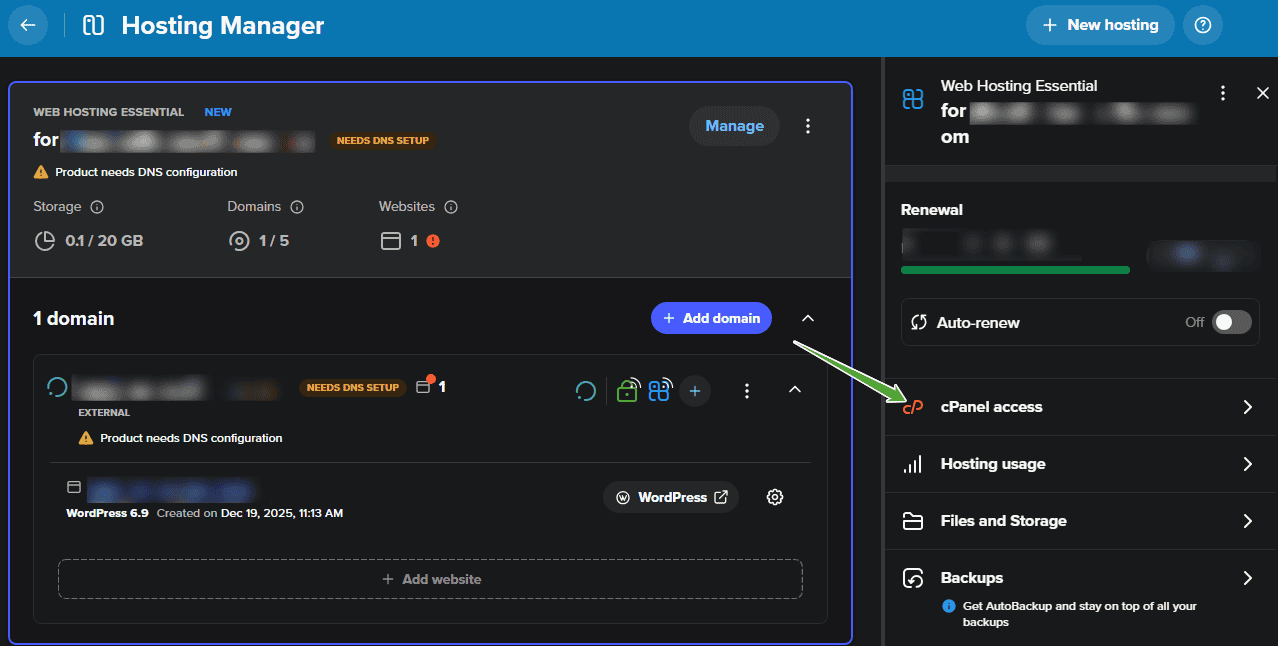
Spaceship Hosting integration with cPanel makes things easy for beginners, navigation is straightforward and uncluttered, and pages load quickly without lag. I could manage domains, update DNS records, access files, and handle databases without stress.
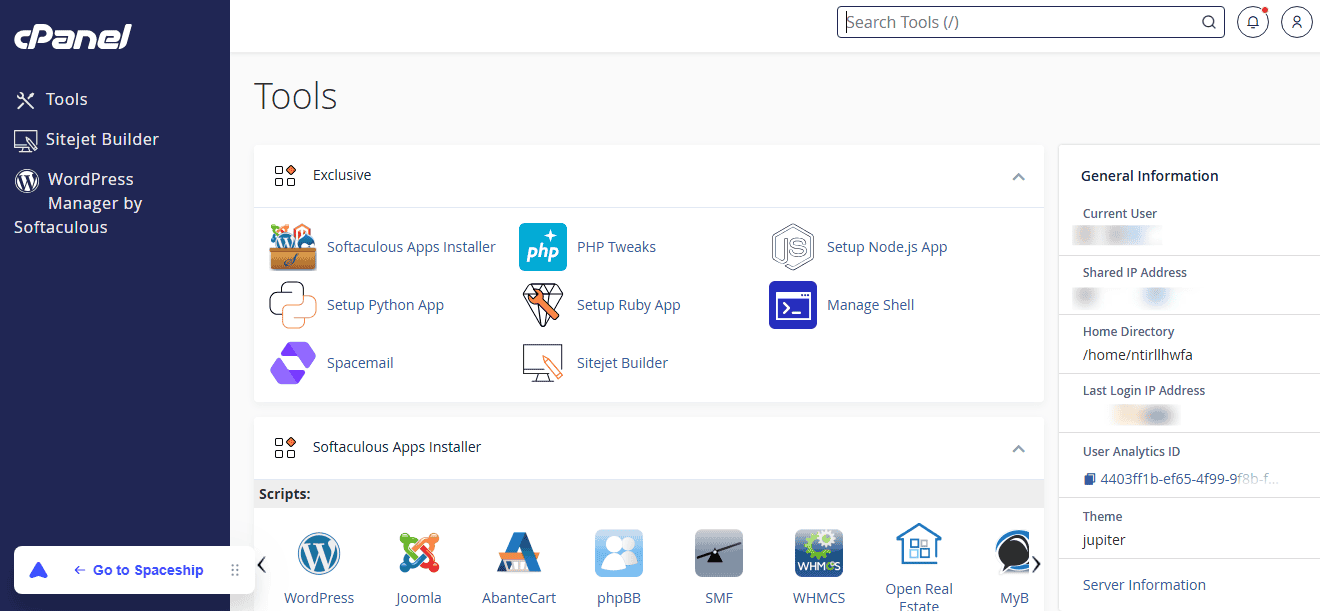
I would rate Spaceship Hosting high for beginners and small site owners who want a clean, no-frills hosting experience. The control panel avoids clutter, focuses on core tasks, and does not overwhelm users with options they may never need.
Final Verdict
After running a live website on Spaceship Hosting for 30 days, testing performance under traffic, managing the control panel daily, reviewing security, and breaking down real pricing, I can say this clearly: Spaceship Hosting delivers exactly what it promises, no more, no less.
I did not encounter random downtime, unexpected slowdowns, or usability issues during testing. Performance remained stable, and routine tasks such as DNS changes, backups, and WordPress management were easy to manage. For a shared hosting platform, this level of consistency matters more than flashy features.
Spaceship Hosting is built for users who want a website online without technical stress. Spaceship shared Hosting plans are ideal if you are running a blog, a business site, a content project, or multiple low-to-medium traffic websites. If your site depends on heavy traffic spikes, custom server configurations, or advanced deployment workflows, you may need to sign up for their VPS or Cloud hosting plan called Hyperlift.
Spaceship Hosting is a solid choice for beginners, bloggers, and business website owners who want reliability, clean management, and fair pricing without unnecessary noise. If you choose it with realistic expectations, Spaceship Hosting does its job well, and that is exactly what good hosting should do.





0 Comments