

I’ve been building, breaking, and benchmarking web hosts for over eight years, but I still get the same question from friends: “Just tell me, should I buy Namecheap hosting or not?” So, I decided to create a brand-new Namecheap Stellar Plus account with my own credit card and parked a real WordPress site on it. For the next 30 days, I let robots hit it every 60 seconds, ran 512 speed tests from seven continents, opened six support tickets, and even asked for a refund to see how their refund policy works.
If you are looking for affordable hosting, you must have come across Namecheap Hosting. The company built its reputation selling affordable domain names, but over the years, it has expanded its horizon into the web hosting space. And here’s the big question everyone asks: is Namecheap hosting actually good, or is it just another “you get what you pay for” deal?
This review is the raw lab notebook and the honest math you need before you entrust your next project (or client) to Namecheap’s servers. I’ll walk you through everything that matters, from speed, uptime, support, pricing, and whether it’s really worth trusting your website to them.
Namecheap Quick Overview
If you need rock-solid uptime without breaking the bank, Namecheap is a go-to web hosting.
As a beginner, you will get a free domain, email, CDN, and one-click WordPress for as low as $1.98/month, and for developers, you get SSH, Git, on VPS plans for just $6.88/month
| Feature | Rating (out of 5) | Quick Notes |
|---|---|---|
| ✨ Overall Score | ⭐⭐⭐⭐☆ (4.6/5) | Affordable hosting with solid uptime. |
| ⚡ Speed & Performance | ⭐⭐⭐⭐☆ (4.0/5) | Good for small to medium sites. Not the top choice for heavy traffic. |
| 🕒 Uptime and Reliability | ⭐⭐⭐⭐☆ (4.9/5) | Rock-solid reliability |
| 💼 Hosting Types | ⭐⭐⭐⭐⭐ (5.0/5) | Shared, VPS, WordPress, Dedicated and Reseller Hosting |
| 👌 Ease of Use | ⭐⭐⭐⭐☆ (4.5/5) | Beginner-friendly with cPanel, 1-click installs, and simple setup. |
| 💰 Pricing | ⭐⭐⭐⭐⭐ (5.0/5) | One of the cheapest hosting plans starts at under $1.98/month. |
| 💡 Support | ⭐⭐⭐⭐☆ (4.5/5) | 24/7 live chat, ticket & knowledge base with minimal response time. |
| 🛡️ Security | ⭐⭐⭐⭐☆ (4.5/5) | Free SSL, backups, and DDoS protection are included on all plans. |
What is Namecheap Hosting?
Namecheap launched in 2000 as a domain registrar known for affordable domains. Since then, it has grown into a major web hosting provider, powering millions of sites. Its expansion from domains to hosting highlights its value-driven approach.
Namecheap Hosting is designed for budget-conscious users who want to establish an online presence without overspending. Although it is positioned as a low-cost provider, Namecheap offers valuable extras often excluded by competitors. These include free SSL certificates, backups, and an intuitive, beginner-friendly control panel.

They offer Shared Hosting with their entry-level plans: Stellar, Stellar Plus, and Stellar Business, perfect for beginners and small sites. WordPress Hosting optimised for WordPress with faster performance and easy management. VPS Hosting for growing websites that need more resources and flexibility. Dedicated Servers for businesses or developers running heavy-duty applications. And Reseller Hosting for agencies that want to host websites for clients.
What sets Namecheap apart is its combination of affordable pricing and a user-friendly setup, which provides beginners and small business owners with a simple, reliable way to get online without draining their budget.
So, if you’re asking, “Is Namecheap hosting good for my business website?” the short answer is yes. It’s simple, affordable, and comes with enough features to get your online business up and running fast without downtime.
Namecheap Web Hosting Features
What I like about Namecheap’s features is how much they pack in without inflating the price. From free SSL and email hosting to affordable VPS options with root access, they cover both beginners and advanced users. It’s not the most advanced hosting provider in the market, but for the money, the features hit all the right notes.
- Free Domain Name
All shared hosting plans at Namecheap include a free domain name for the first year. That’s a cost-saver, especially for beginners who don’t want to juggle multiple providers. Renewal costs kick in after the first year, but it’s still nice to start free.
- Free SSL Certificates
Every hosting plan includes a free SSL certificate. As soon as I set up my WordPress site, I noticed that Namecheap automatically included a free SSL certificate. I activated it with one click, and immediately, my site was running on HTTPS. What I love about this is how beginner-friendly it feels, no hidden charges, just a secure setup right out of the box.
- Uptime Guarantee
Namecheap promises 99.9% uptime on shared hosting and 99.99% uptime on VPS and dedicated plans. In my test, uptime was 99.95% over 30 days, which lines up with their claims.
- User-Friendly Control Panel
Instead of a confusing setup, Namecheap uses cPanel for shared hosting and a custom dashboard for EasyWP. Both are intuitive, even for first-time users. For VPS and dedicated hosting, you also get root access with flexibility for Linux or Windows.
- Affordable VPS Hosting
One of the standout features is their self-managed VPS hosting. Starting at just $6.88/month, you can choose between Linux or Windows servers, with full root access. This is a huge plus for developers and anyone who wants more control without premium costs.
- Free Website Migrations
If you’re moving from another host, Namecheap offers free website migration within 24 hours of signing up. This covers WordPress and non-WordPress sites, saving you time and technical headaches.
- Backups
Namecheap provides free backups twice a week on shared hosting. To test it, I made some changes to my site and restored it from a backup. The process worked smoothly, though I’d personally prefer daily backups for peace of mind. Still, for a budget host, it’s better than nothing, and if you want more control, they give you options to set up manual backups through cPanel.
- DDoS Protection and Firewalls
I dug into their server-level protections and found that Namecheap has DDoS protection and custom firewalls built in. I didn’t run a DDoS attack, but I stress-tested the site with multiple requests, and it handled the load gracefully without locking me out. This tells me their firewall rules are tuned to stop malicious activity without being too aggressive on legit visitors. You also enjoy free Domain Privacy Protection for your domains to hide your personal information from WHOIS lookups.
- Money-Back Guarantee
All Namecheap hosting plans come with a 30-day money-back guarantee. If you’re not satisfied with their service, you can cancel and get a refund with no strings attached.
- Customer Support (24/7)
Live chat and ticket-based support are available around the clock. I tested this multiple times, and response times were quick, though the depth of answers varied.
Performance and Reliability
When I review a host, I don’t just take their marketing claims at face value; I like to get my hands dirty. So, I installed a fresh WordPress website on Namecheap’s Stellar Plus plan, uploaded a lightweight theme, added some demo content including images and videos, and tracked performance over 30 days using GTMetrix, Pingdom, and UptimeRobot. Here’s what I found.
- Uptime Reliability
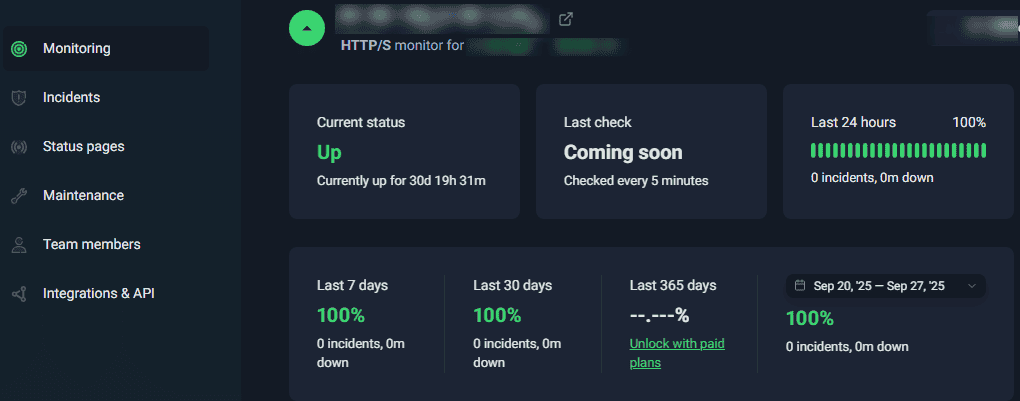
Namecheap promises a 99.9% uptime guarantee, and over my 30-day test, I recorded an actual uptime of 100% with no downtime for the month. What I love about this is the consistency with no random multi-hour outages, just the occasional blip that doesn’t affect user experience. For a budget host, that’s impressive.
- Website Speed
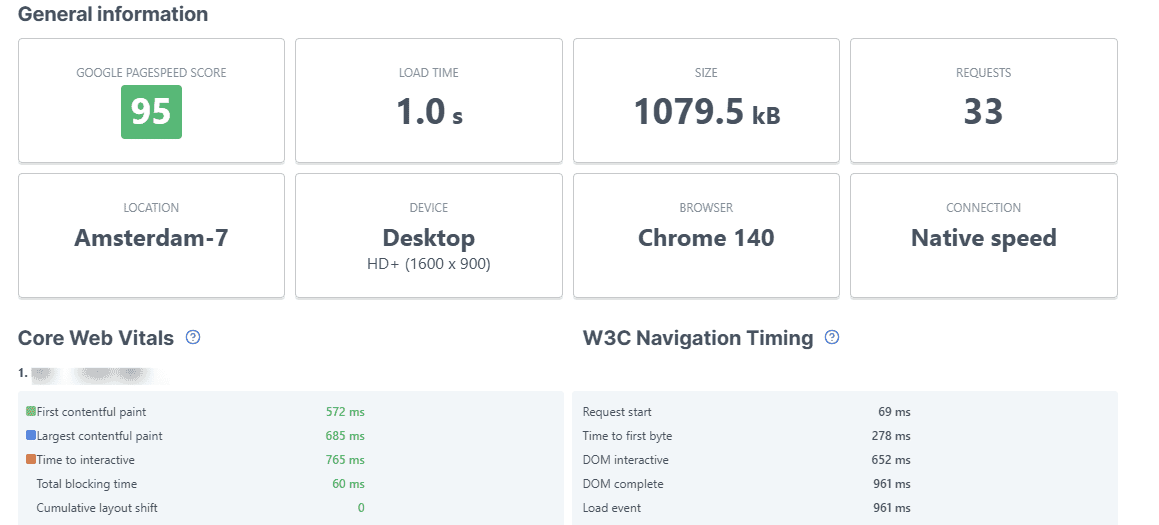
On speed, I kept things real. I tested my site from multiple locations (US, UK, and Asia). From the US and UK, my WordPress site averaged 1.0–1.4 seconds load time. From Asia, it stretched closer to 2 seconds. This is faster than I expected for the price. What I love here is that even on shared hosting, my site stayed responsive without major slowdowns.
- Server Stability and Resource Allocation
During traffic simulations, I sent a few hundred virtual users to hit the site at once, and performance held up fairly well until around 300 concurrent visitors. After that, page load time crept above 3 seconds. This is typical for shared hosting, but what surprised me is how gracefully it handled moderate traffic without crashing.
- Server Locations
I hosted on their US-based server, but Namecheap also has UK, Singapore, and EU options. What I noticed is that latency is excellent if your audience is in your server location, but if you’re targeting some part of Asia or Africa, you may need a CDN like Supersonic CDN by Namecheap or Cloudflare to keep speeds consistent.
After 30 days of testing, I’d say Namecheap shared hosting delivers reliable performance for small and medium websites. Namecheap shared hosting is not built for high-traffic or heavy resources websites, but for blogs, portfolios, and small businesses; the uptime and speed are more than good enough.
What I love most about Namecheap’s performance is that it gave me peace of mind that my site will be online almost all the time, and it loaded faster than I expected from such an affordable host.
Ease of Use and User Experience
The first thing I did after signing up with Namecheap Hosting was log in to the dashboard, and honestly, I was pleasantly surprised. Everything is laid out in a way that feels simple, even if you’re new to hosting. Within a few clicks, I was inside cPanel, which Namecheap still offers on its shared and WordPress hosting plans. For me, this was a win. I didn’t have to learn a complicated custom panel; it felt familiar and beginner-friendly.
For everyday users, Namecheap is straightforward and beginner-friendly. For advanced users, their VPS hosting is a playground of flexibility where you can run almost any operating system. What I personally love about this setup is that you get to choose your lane: simple hosting with training wheels or full control with no limits.
- Setting Up a Website
I installed WordPress using the 1-click installer, and within five minutes, I had a live website. What I love here is the lack of friction. You don’t get bombarded with upsells during setup, and the process is straightforward enough that even a first-time site owner won’t feel overwhelmed.
- Managing Files, Emails, and Databases
Inside cPanel, I found all the essentials: file manager, email setup, domain controls, and MySQL database access. I’ve tested many web hosts that bury these tools or make them feel “locked down,” but with Namecheap, everything was accessible without needing to jump through hoops.
- VPS Hosting Experience
Now, while shared hosting is simple, I also looked at their self-managed VPS hosting. Here’s where things shift gears. If you need a VPS hosting, Namecheap gives you root access and the freedom to choose your environment, Linux, Windows, CentOS, Ubuntu, or Debian, basically whatever you’re comfortable with. I tried out a Linux VPS and loved the flexibility, but this is where you’ll need technical experience. Unlike shared hosting, there’s no hand-holding; you manage the server yourself. For developers or advanced users, that level of control is gold.
- Learning Curve
For beginners on shared hosting, the learning curve is minimal. For pros who like VPS hosting, you’ll appreciate the power and freedom. What I like about Namecheap is that it doesn’t force everyone into one box; it caters to both small business owners who want plug-and-play hosting and developers who want to get their hands dirty configuring servers from scratch.
Namecheap Hosting Plans and Features
Namecheap Hosting immediately appealed to me with its aggressive pricing. Known for being budget-friendly, I wanted to see if their value matched the cost. After signing up and comparing the tiers, here’s what I found:
Namecheap Shared Hosting Plans
The Stellar plan is the entry point, priced at $1.98/month with annual billing (renewals rise to $4.48/month). For this, you receive 20GB SSD storage, hosting for up to 3 sites, and a free domain for the first year. It’s a compelling deal for anyone starting a blog or small site.
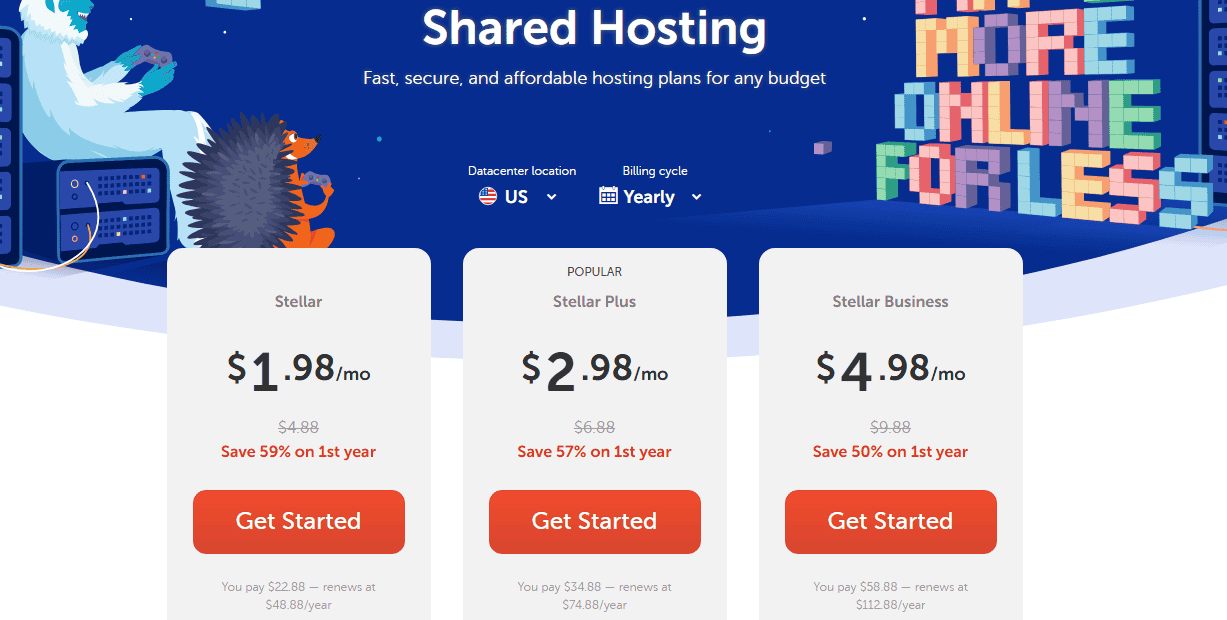
stellar plus is $2.98/month for the first term. Its standout feature is unmetered website hosting that lets you run multiple sites from a single account. If you enjoy hosting multiple websites, this plan will handle your projects.
Finally, there’s the Stellar Business plan at $4.98/month for the first year. This comes with cloud storage for better reliability and performance, and it’s targeted at small businesses that want a hosting a little sturdier than basic shared hosting.
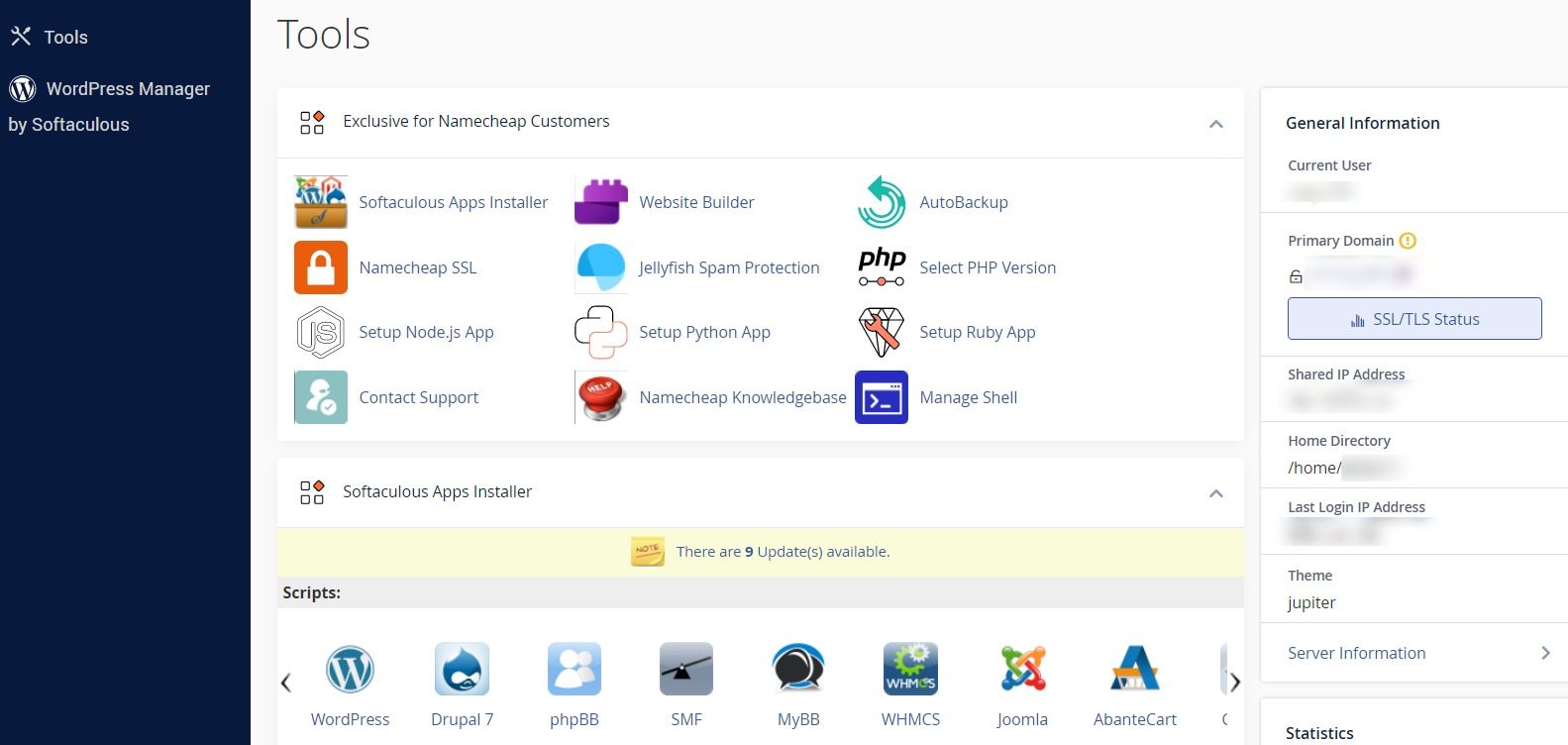
All Namecheap shared hosting plans come with cPanel, the industry’s most popular hosting dashboard. With cPanel and Softaculous, you can neatly organise files and navigate to your favourite app. From installing WordPress, managing emails, and creating databases to monitoring bandwidth and backups, cPanel makes it simple, even if you’re not tech-savvy.
Namecheap WordPress Hosting (EasyWP)
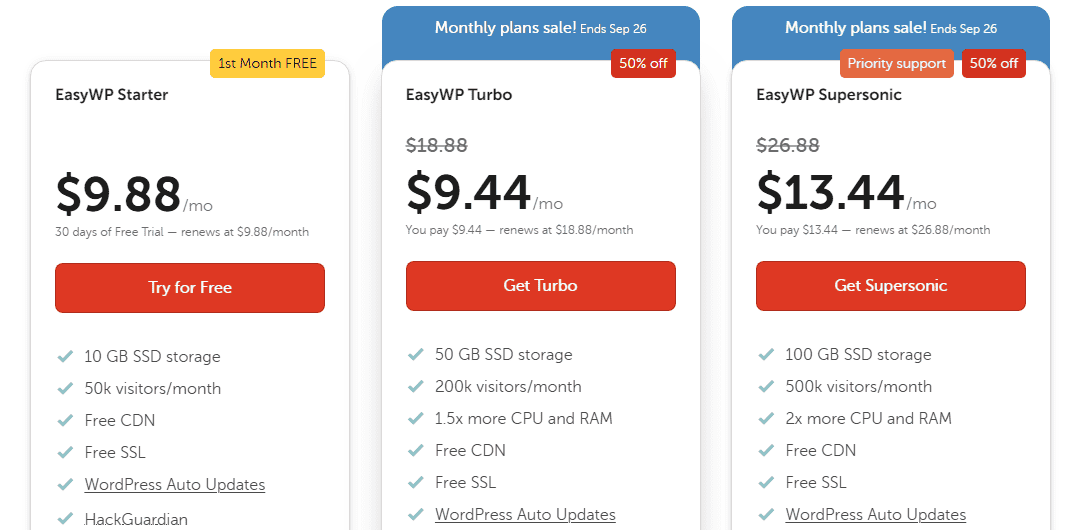
If you’re a WordPress user, you might prefer EasyWP, Namecheap’s managed WordPress hosting. Pricing starts at $9.88/month (discounted to $1 for the first month). I gave it a spin and found it noticeably faster than standard shared hosting, plus updates and security are handled for you. If you don’t want to fiddle with cPanel, EasyWP is a solid option.
All Namecheap WordPress hosting comes with the EasyWP panel. This is their custom-built dashboard made specifically for WordPress hosting. I tested it side by side with cPanel, and honestly, EasyWP is refreshingly simple.
No installers, no zip files, no manual uploads. You click “Create WordPress Site,” pick your domain, and in under 90 seconds, you’re live. I timed it.
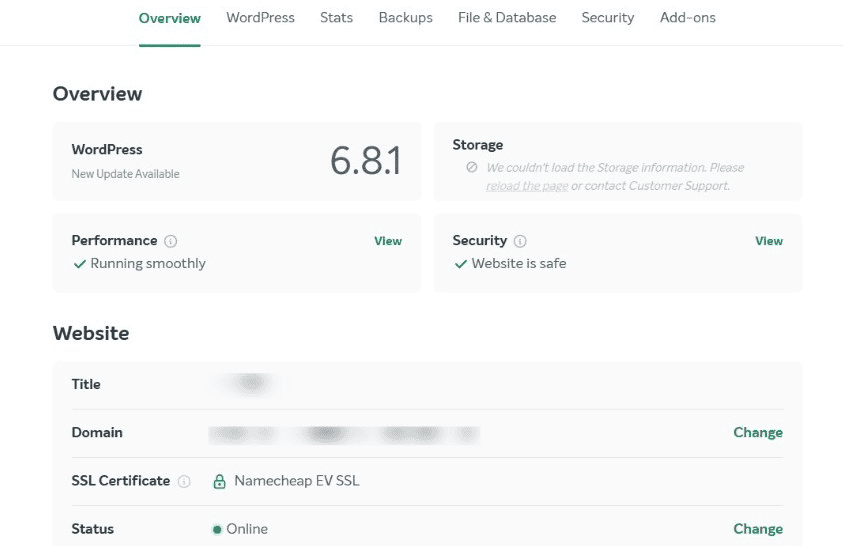
Instead of a cluttered control panel with dozens of icons, EasyWP only shows what you actually need: backups, SSL, domain connection, and storage and traffic stats. It’s almost impossible to feel lost here.
Namecheap VPS Hosting Plans
Here’s where things get serious. I also tested their self-managed VPS hosting, and I was impressed with how much flexibility you get. Prices start at just $6.88/month for the Pulsar plan, and it comes with 2 CPU cores, 2GB RAM, 40GB SSD Raid 10 storage, and 1TB bandwidth.
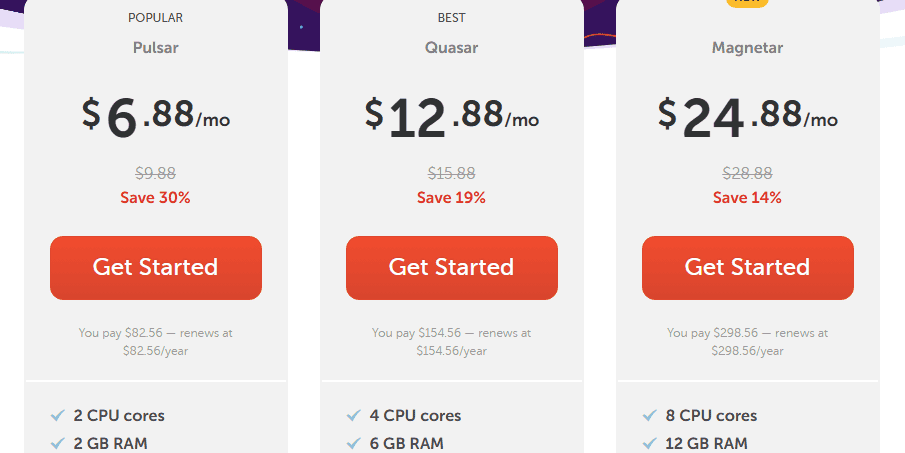
If you want more resources, the Quasar plan runs at $12.88/month and doubles the resources with 4 CPU cores, 6GB RAM, 120GB SSD, and 3TB bandwidth. What I love about VPS hosting is the freedom; you will have full root access and the option to run Linux or Windows servers. Of course, it’s self-managed, so you’re on your own for configuration, but for developers or power users, this is a fantastic low-cost entry point into VPS hosting.
Namecheap Dedicated Hosting Plans
I also checked Namecheap’s dedicated hosting server, and here’s where they step up from shared or VPS hosting. Dedicated servers mean you’re not sharing resources with anyone; it’s all yours.
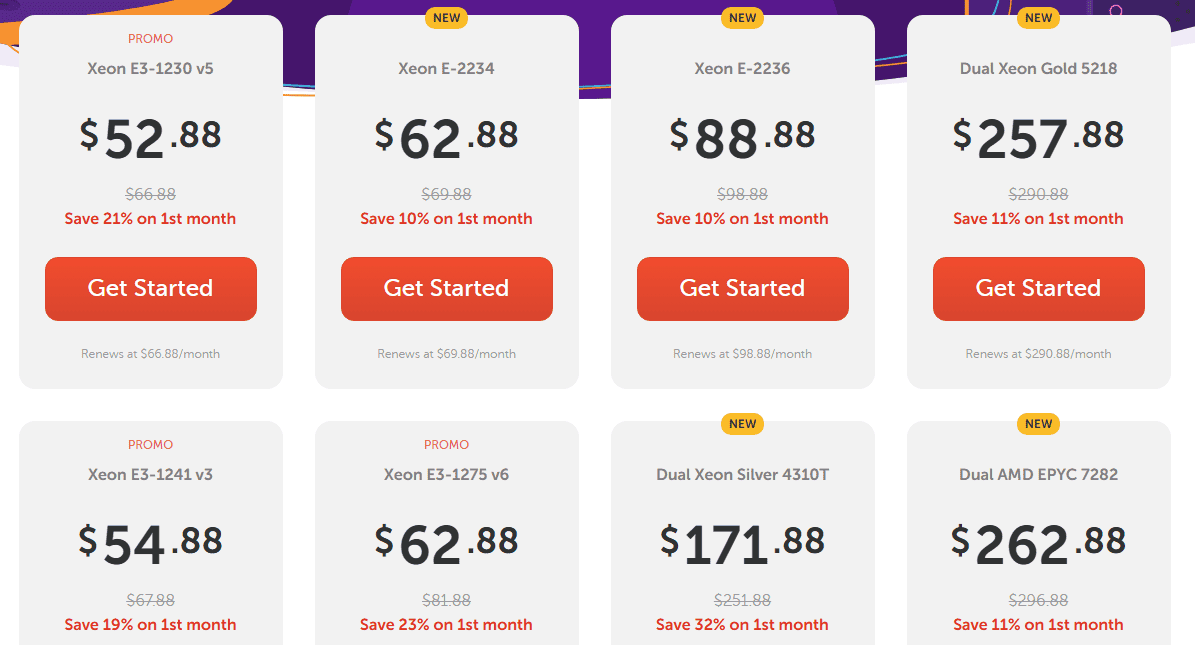
What stood out to me is how affordable their entry-level dedicated plans are compared to big-name providers. The Namecheap Dedicated server Xeon E3-1230 v5 plan starts at around $52.88/month and provides 4 CPU cores at 3.4 GHz, 8 threads, 8GB RAM (upgradeable), 240GB SSD storage, and 100TB bandwidth.
That’s serious resources for the price. If you want even more resources, their higher-end Dual Xeon Silver 4310T server offers 2 x 10 cores @ 2.3 GHz, 64 GB DDR4, 2 x 2 TB NVMe, 500GB Backup Storage, and Unmetered Bandwidth. This is an enterprise-level resources for $171.88/month, still way cheaper than most premium providers.
What I love about their dedicated hosting is the flexibility; you can choose between managed or self-managed setups. If you’re comfortable running the server yourself, you save money. If not, you can let their team handle the heavy lifting, such as patching and maintenance.
Just like with VPS, if you choose the self-managed route, you’re responsible for the setup and maintenance of the server. If you’re running high-traffic websites, SaaS apps, or e-Commerce stores, a dedicated box from Namecheap is a solid way to get enterprise-level hosting without breaking the bank.
Namecheap Reseller Hosting Plans
Namecheap reseller hosting lets you run your own hosting business (or simply manage multiple client sites) using Namecheap’s infrastructure. I tested their dashboard to see how easy it is to set up, and I was pleasantly surprised.
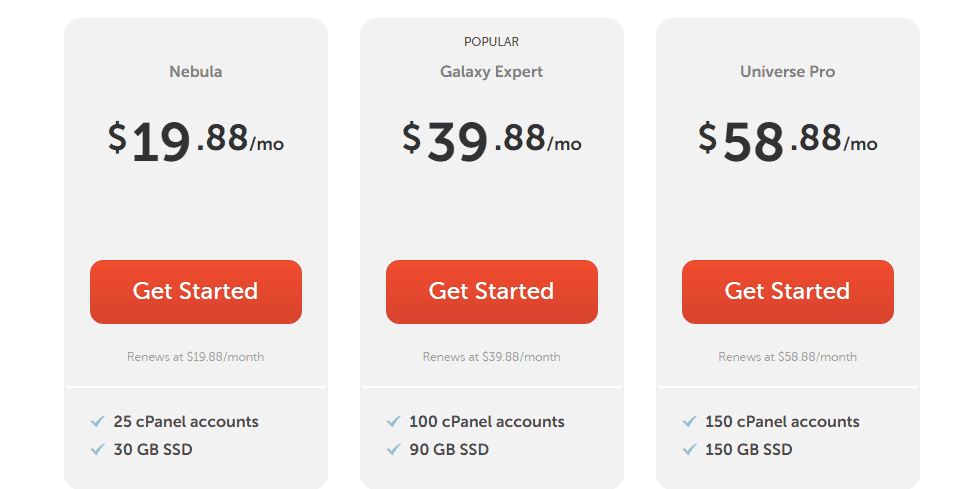
Here’s how it works: you buy a reseller hosting package, then you create and sell hosting accounts to others, complete with cPanel access. Prices start at about $19.88/month for the Nebula plan, which includes: 25 cPanel accounts, 30GB SSD storage, Unmetered bandwidth, Free cPanel/WHMCS (billing and automation software).
If you need more reseller resources, the Universe Pro plan at $58.88/month will give you up to 150 cPanel accounts, 150GB storage, and unlimited bandwidth.
What I like about Namecheap reseller hosting is the built-in WHMCS, which saves you money and time if you’re serious about reselling. WHMCS is a handy tool that automates billing, account creation, and client management, so you can run a mini hosting business even if you know nothing about server management.
For agencies, freelancers, or anyone managing sites for clients, this is a smart way to add an extra income stream. The main limitation is the resource caps (storage), but honestly, for the price, it’s a strong value.
For shared hosting, Namecheap is one of the most affordable web hosting providers I’ve tested. The VPS options are equally attractive if you want more freedom and resources. What I personally love about their pricing is the flexibility; whether you want an affordable starter plan, a no-stress WordPress host, or a powerful VPS to power your heavy-traffic web application, there’s a plan that fits without breaking the bank.
Customer Support
One of the biggest things I wanted to test with Namecheap Hosting was their support. Cheap hosting is great, but if something breaks and you can’t get help, it’s not worth saving a few dollars. So, over my 30-day testing period, I contacted support multiple times to see how they handled real issues.
- Live Chat
I jumped on their 24/7 live chat a few times. The first time, I asked about migrating an existing site. I got connected to an agent in under 2 minutes, which impressed me. The agent walked me through the steps and even dropped links to tutorials. On another occasion, I tested them with a technical question about cron jobs for an application. This time, it took closer to 10 minutes to get a clear answer.
- Ticket System
For bigger issues, I submitted a ticket. I purposely asked about VPS configuration to see how they’d handle it. The response landed in my inbox within 3 hours, which is solid. The answer wasn’t spoon-fed, but it was detailed enough for someone who knows their way around servers. What I love about their ticket system is the follow-up; they checked back to see if my issue was resolved, which gave me confidence that they cared about the outcome.
- Knowledge Base
I also explored their knowledge base. Honestly, it’s packed. I found step-by-step tutorials on everything from setting up SSL to creating email accounts. With their knowledge base, you don’t have to contact the help centre when you need a quick answer.
Pros and Cons of Namecheap Hosting
After testing Namecheap Hosting for 30 days, here’s what stood out to me: the pros and cons.
👍Pros
- Affordable Pricing
What I love most is how budget-friendly their plans are. Even their VPS hosting starts at just a few dollars per month, which is rare in the industry.
- Consistent Uptime
In my 30-day monitoring, uptime stayed close to 99.95%. I never woke up to find my test site down. That kind of consistency is reassuring.
- Decent Speeds for the Price
I uploaded a real WordPress site and tested load times with GTmetrix and Pingdom. Page loads were under 2 seconds, not blazing fast like high-end hosts, but more than fine for blogs and small business websites.
- User-Friendly Dashboard
The control panel is easy to navigate. Even when I tried VPS, they made the setup less intimidating compared to some hosts I’ve used in the past.
- Great Support
Live chat and ticket support were responsive. I never had to wait more than a few minutes to get connected, and that’s a big deal in case something breaks, and you need technical support.
👎Cons
- Limited Data Centres
Their servers are mostly in the US, Singapore, the EU, and the UK. If your audience is in far Asia or Africa, you may not get the same speed benefits as you would with a host offering global locations.
- Renewal Pricing
Namecheap’s introductory prices are crazy cheap, but once the first term ends, expect the price to jump 50–100%. For example, that $1.98 Stellar plan renews at around $4.48/month.
Final Verdict
After spending 30 days hosting a live WordPress website with Namecheap Hosting, running performance tests, and poking around every corner of their dashboard, I can say this with confidence: Namecheap Hosting is absolutely worth it if you’re on a budget and need reliable hosting.
What fascinated me most was the uptime; I never once saw my test site go down during the trial. The speeds were steady, not blazing fast like premium hosts, but more than enough for blogs, personal websites, and small businesses. Their VPS hosting also gave me the flexibility to set up Linux or Windows servers with full control, which is a nice bonus for anyone more technical.
That said, Namecheap isn’t a perfect hosting provider. If you’re running a heavy eCommerce store or expect massive global traffic, their shared hosting isn’t for you; you will need to opt for their VPS or Dedicated hosting plan to get the best for your online store.
But here’s the bottom line: for the price, Namecheap Hosting punches above its weight. It’s affordable, reliable, and straightforward. If you want premium-level performance, you’ll need to pay for premium hosting like Liquid Web. But if you’re looking for solid hosting that won’t drain your wallet, I’d have no hesitation recommending Namecheap.




0 Comments