

Why pay hundreds of dollars a month to send emails when you could buy the software once and send unlimited campaigns for life from your own server? With robust features like automation, detailed analytics, and customisable templates, you can build stronger relationships with your audience and drive more conversions for a one-time licence fee of just $86.
Email marketing can feel like paying rent for software. Every month, the bill shows up, about $49 or more. Before you know it, your email marketing budget starts piling up to something tangible.
But what if you could own your email marketing platform outright? No recurring payments. No limits on subscribers. No surprise price hikes when you add new lists.
That’s where MailWizz comes into play. MailWizz is what happens when someone decides to self-host an email marketing platform. And the best part? You don’t need to be a tech wizard to use it. If you can install or use WordPress, you can install and use MailWizz to power your email marketing efforts.
In this review, I’ll show you why over 18,000 small companies and individual businesses are switching from paid SaaS email marketing tools to MailWizz.
MailWizz Quick Overview
Here is a concise snapshot of MailWizz at a glance. We break down its core features, evaluate how effectively each one performs, and highlight the benefits you gain from using them. This table will help you determine whether MailWizz aligns with your email marketing goals quickly.
| Feature | Rating | Details |
|---|---|---|
| Campaign Management | ⭐⭐⭐⭐ | You can create, schedule, and manage email campaigns with ease. |
| Email List Management | ⭐⭐⭐⭐⭐ | You can organise subscribers into lists, segment by behaviour, and keep data clean. |
| A/B Testing | ⭐⭐⭐⭐ | You can test different subject lines or content versions to see what engages best. |
| Transactional Email | ⭐⭐⭐⭐ | Send triggered messages, such as password resets, to improve user experience with timely and personalised emails. |
| Automated Workflows | ⭐⭐⭐⭐ | To set behaviour-based triggers and follow-up sequences for automated engagement with subscribers. |
| Multi-Server Support | ⭐⭐⭐⭐ | Connect multiple sending servers for higher throughput and better deliverability control. Ideal for scaling. |
| Custom Templates | ⭐⭐⭐ | You enjoy the drag-and-drop builder and custom HTML support to make the design flexible |
What is MailWizz?
MailWizz is a robust and advanced self-hosted email marketing and delivery system that you can use to create email campaigns and send quality emails to your audiences. It comes packed with irresistible features that modern email marketing solutions offer; it’s a self-hosted, one-time payment email marketing and lists management software that allows you to create and manage your Email Lists, create marketing campaigns, monitor and analyse results, and manage your sending servers.
Instead of paying a company every month to manage your email campaigns like Mailerlite or Kit, you buy MailWizz once, install it on your server, and you’re in control. Once you purchase it, you retain full ownership, with no restrictions on the number of subscribers, no upgrade prompts, and no recurring monthly fees.
So, what can you do with it? Pretty much everything you’d expect from a fancy email marketing platform: Build and manage email lists, create email campaigns (Newsletters, promos, launches—you name it), Set up autoresponders (So your emails go out automatically), Segment your audience (Send the right message to the right people), Track opens, clicks, and unsubscribes.
MailWizz Key Features
MailWizz is a comprehensive email marketing platform that offers various features to help you manage and optimise your email campaigns. From AI-driven insights and A/B testing to robust list management and email authentication, it provides tools to enhance deliverability, engagement, and overall campaign performance.
Here are some of its key features you can use to scale your email campaigns while maintaining compliance and high deliverability rates.
- AI Assistant
The AI Assistant in MailWizz leverages artificial intelligence to help you optimise your email marketing campaigns. It can suggest improving subject lines, email content, and segmentation strategies. This feature can help you save time and improve campaign performance with data-driven insights.
- Campaigns Management
MailWizz's campaign management feature allows you to create, schedule, and monitor email campaigns. You can track open rates, click-through rates (CTR), and conversions. This feature ensures that you have full control over your email marketing efforts, from planning to execution and analysis.
- A/B Testing
A/B testing enables you to test different versions of an email campaign to determine which performs better. For example, you can test variations of subject lines, email content, or calls-to-action (CTAs). This feature helps identify the most effective strategies to engage recipients and improve overall campaign results.
- Email Lists Management
You can create multiple email lists. It allows you to organise and segment your subscriber lists effectively. You can categorise subscribers based on demographics, behaviour, or engagement levels. Proper list management ensures targeted and personalised email campaigns, leading to higher engagement rates.
- Bounce Servers
MailWizz's bounce servers handle bounced emails, which fail to reach recipients due to invalid addresses, full inboxes, or other issues. Managing bounce servers ensures that email deliverability is optimised and that invalid addresses are removed from the list to maintain a healthy sender reputation.
- Suppression Lists
Suppression lists contain email addresses that should not receive emails from your campaigns. These may include unsubscribed users, invalid addresses, or contacts who have marked previous emails as spam. Managing suppression lists helps you to maintain compliance with anti-spam laws and improve your sender reputation.
- Email Templates
Email templates are pre-designed layouts that you can customise for your campaigns. It offers various templates to suit different purposes, such as newsletters, promotional emails, or transactional messages. Templates save time and ensure consistency in branding and design. You don't have to build every email from scratch. MailWizz comes with pre-made email templates you can customise and save your favourite designs to reuse later.
- Sending Domain
This is your email sending identity, the domain name you will use to send emails. Configuring a custom sending domain will improve your email deliverability and build trust with recipients. It also helps avoid issues related to shared IPs and ensures that emails appear to come from a legitimate source.
- API Keys
If you’re a bit tech-savvy (or hire someone who is), you can connect MailWizz to other apps using API keys. API keys allow integration between MailWizz and third-party applications or custom systems. You can use these keys to automate tasks, retrieve data, or extend its functionality.
- Landing Pages
Yes, MailWizz also lets you build simple landing pages for things like newsletter sign-ups, event registrations, and freebie downloads. Landing pages are standalone webpages designed to capture leads or drive specific actions, such as sign-ups or purchases.
- Transactional Email
Transactional email in MailWizz enables you to send automated, one-to-one emails triggered by user actions. These emails are sent instantly and contain important information that the recipient expects to receive. Such as password resets, account confirmations, login alerts, order receipts, or payment notifications.
Unlike bulk campaigns, transactional emails focus on speed and delivery. MailWizz handles this well by prioritising these messages so they land in the inbox when timing matters most. Since these emails are action-based, they usually get higher open rates and faster reads.
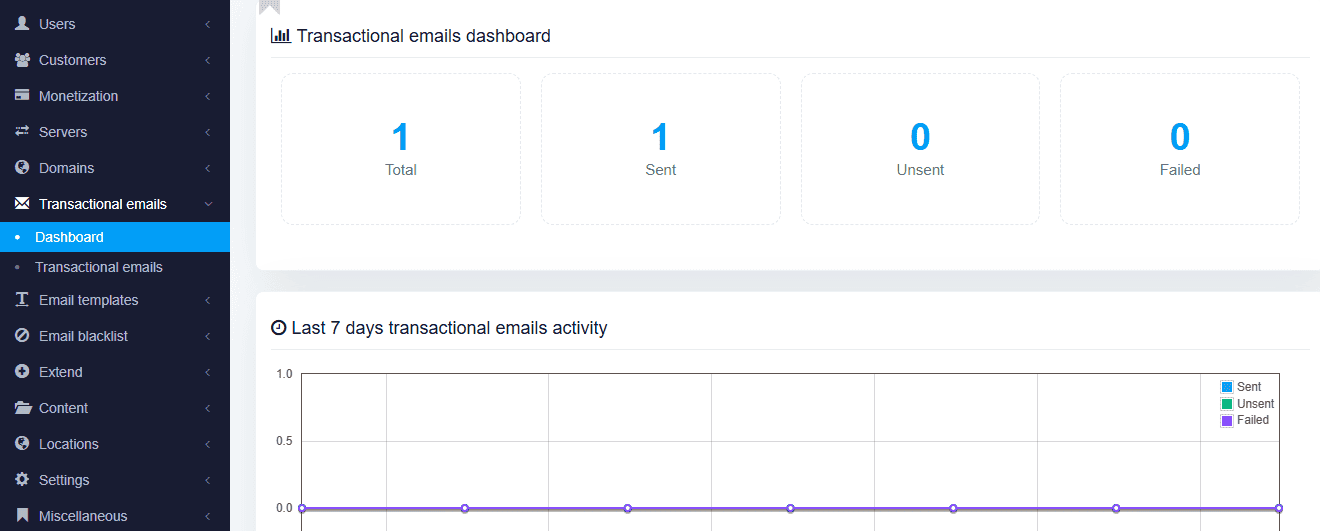
You also keep full control over branding and content. You can customise templates to match your business tone while still keeping the message clear and direct. This helps build trust, improves user experience, and keep communication smooth without manual effort.
- SPF/DKIM Settings
SPF (Sender Policy Framework) and DKIM (DomainKeys Identified Mail) are email authentication protocols that tell email providers like Gmail that the message came from you, not some scammer pretending to be you. Configuring these settings will verify that emails are sent from authorised servers and prevent spoofing or phishing attempts.
- Mass Emails
Want to send one email to 10,000 people at once? No problem. MailWizz is designed to handle bulk email sending efficiently while maintaining high deliverability rates. This feature allows you to reach thousands or even millions of subscribers.
- Delivery Servers
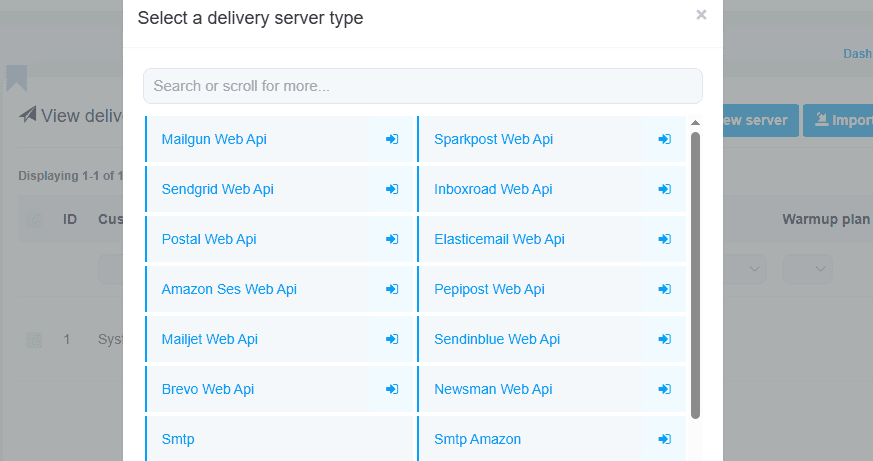
Delivery servers are responsible for sending emails to recipients. MailWizz supports multiple delivery server configurations, including SMTP, Amazon SES, SendGrid, and others. You can choose the best option based on your needs and scale your email-sending capacity accordingly. You can also set rules like, “Use Server A for my main list and Server B for backups.” This feature gives you full control over how your emails are delivered.
- Multiple Email Builders
Not a fan of complicated editors? No problem. It gives you multiple ways to build your emails: drag-and-drop editor (for quick, visual building), HTML editor (if you like getting your hands dirty) and plain text editor (for simple, no-frills emails). With MailWizz, you can create professional emails in a jiffy.
Is MailWizz Easy to Use?
Self-hosted email marketing software can sound scary if you’ve never done it before. Most people imagine coding, servers, Linux commands, and all sorts of headaches that never end. MailWizz isn’t as complicated as you think. If you’ve ever installed WordPress or uploaded files to your website, you can install and use MailWizz.
MailWizz offers a simple setup with a one-time payment. Upload the files to your hosting account, run the setup wizard, configure the SMTP settings, and send emails. It also comes with detailed installation guides and step-by-step instructions to guide you.
- Clean Dashboard
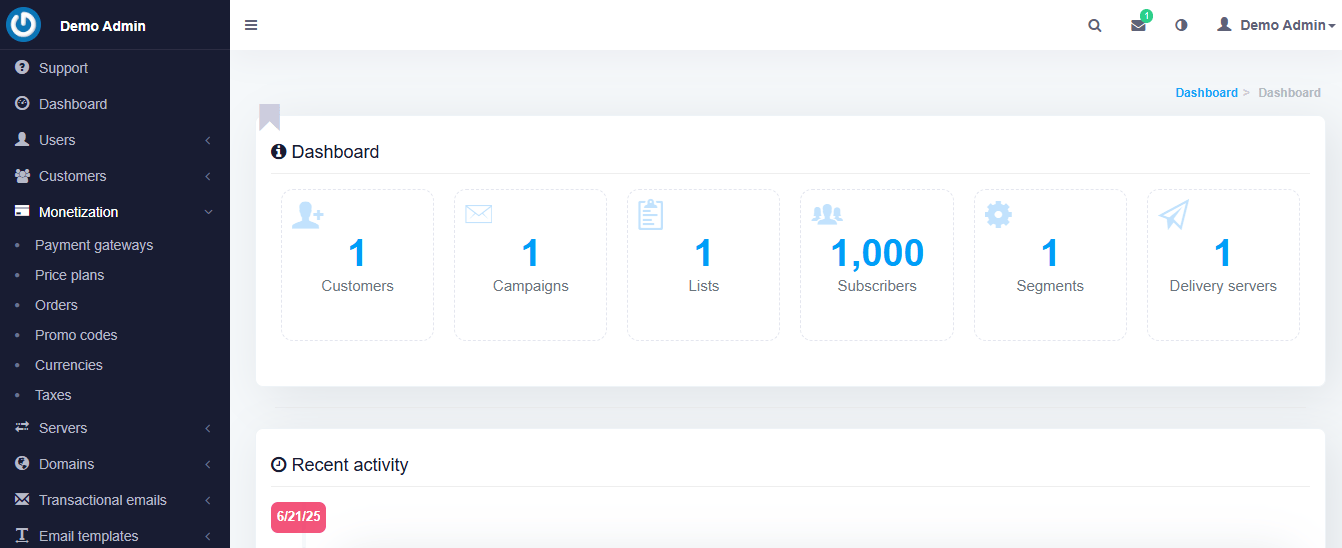
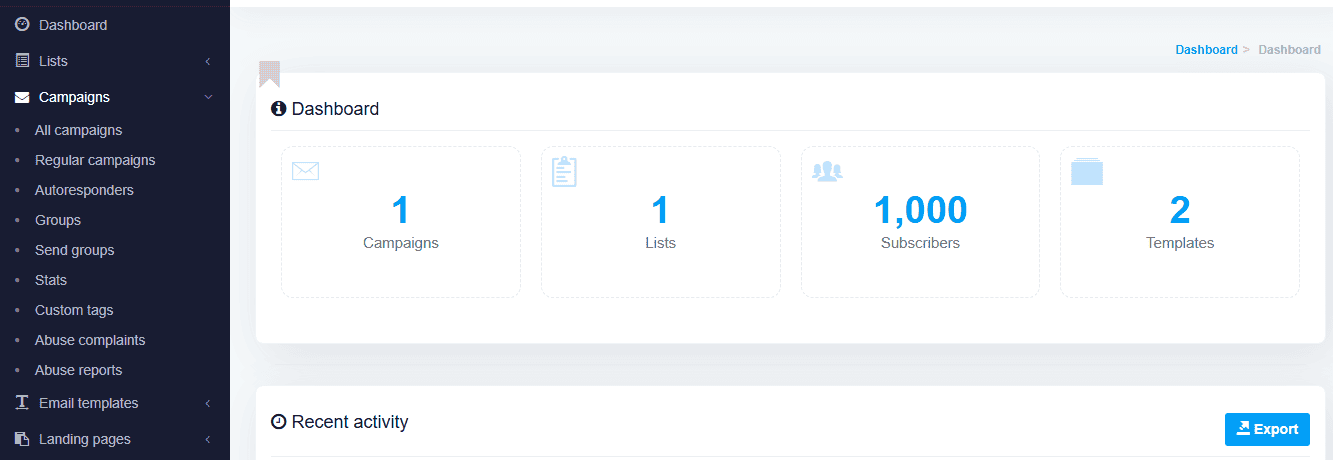
Once it’s installed, MailWizz looks and feels like any other email marketing platform. The dashboard is clean, organised, and easy to navigate. You can easily create a campaign, manage lists, view reports, set autoresponders, and create landing pages.
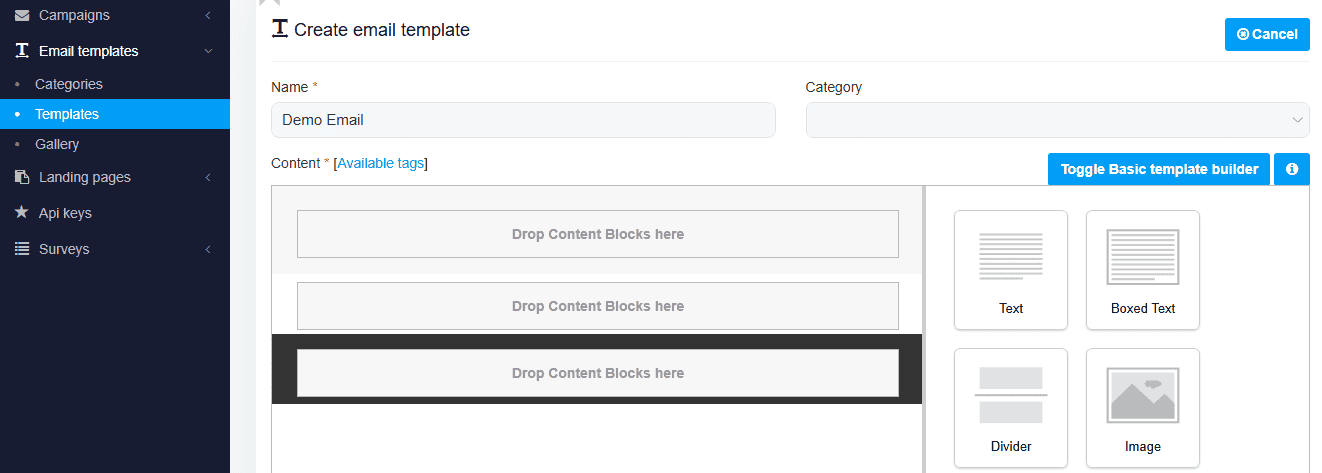
- Multiple Email Builders
Whether you’re a click-and-drag person or someone who prefers to copy-paste HTML email code from Notepad, you can build emails your way. You won’t get stuck using some confusing editor that slows you down.
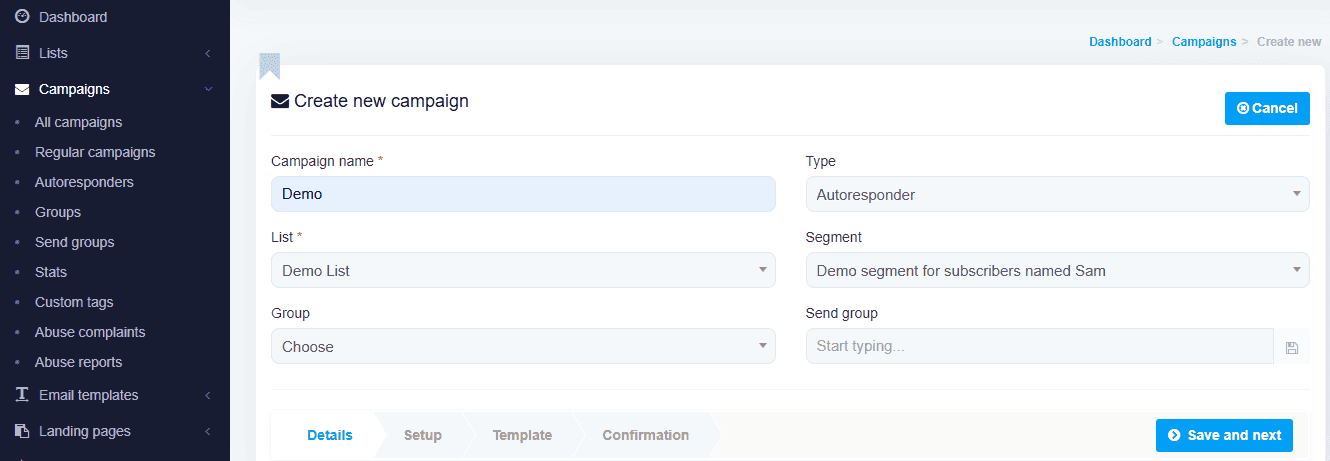
- Automation Without Confusion
MailWizz lets you set up autoresponders and email sequences, but it doesn’t throw a million options at you as some over-complicated platforms do. You get what you need: You can easily set it to send email A, then email B, then email C… and so on.
If you can manage basic website tools such as WordPress, Shopify, or upload images to your blog, you will be comfortable using it. It’s built for non-techies who want to own their email marketing system without stress.
- Extensions
MailWizz supports tons of extensions, which makes it easy to expand what the platform can do without touching core files. Extensions work like add-ons. You install only what you need, when you need it. Extensions turn MailWizz into a modular email platform you can shape around your business goals as your business grows.
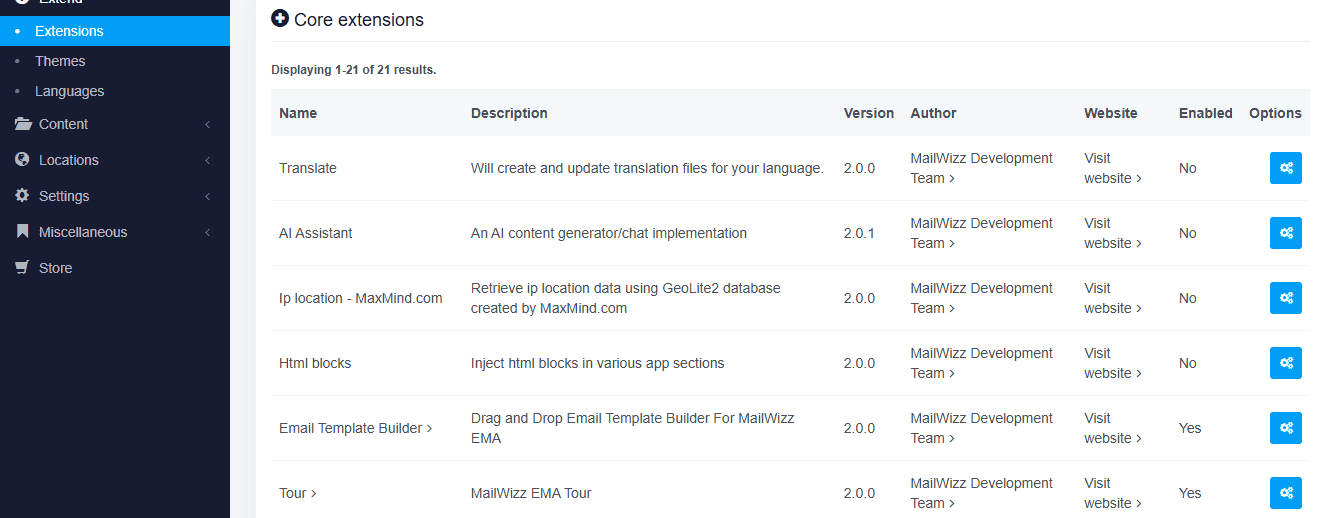
With extensions, you can enhance almost every part of MailWizz. Want advanced reporting? There’s an extension for that. Need email verification, payment gateways, extra authentication, custom sending logic, or third-party app connections? Extensions make it happen.
Most extensions plug in seamlessly through the MailWizz admin dashboard. You can install, enable, disable, or update them in a few clicks. This setup keeps your system flexible while staying safe during updates, since the core software remains untouched. The real win here is scalability. As your email operation grows, MailWizz grows with you. You start lean, then layer on features as your needs change. It’s like adding tools to a toolbox instead of buying a whole new workshop.
MailWizz Pros and Cons
We all agreed that no tool is perfect, right? Even though MailWizz can save you a ton of money, it comes with some pros and cons:
Pros
- One-Time Payment
This is probably why you’re reading this review in the first place.
Pay once. Own it forever. Unlike some of the big-name platforms that charge an arm and a leg, MailWizz offers a one-time payment option (yes, one-time !) You get a ton of features without breaking the bank.
- Self-Hosted Freedom
One of the coolest things about MailWizz is that it’s self-hosted. That means you control your data, server, and email campaigns. No third-party restrictions or worrying about someone else’s rules.
- Scalability
Whether you’re sending a few hundred emails or blasting out millions, MailWizz can handle it. It’s built to scale with your business, so you don’t have to switch platforms as your email list grows. Plus, it integrates with multiple delivery servers (like Amazon SES or SendGrid), so you can determine your sending capacity easily.
- Robust Feature Set
Despite its one-time payment price, it doesn’t skimp on features. You’ve got A/B testing, automation, landing pages, suppression lists, bounce management, an AI Assistant, and more to get your work done!
- Developer-Friendly
If you’re a techie or working with developers, it is a dream email marketing app you can have. You can customise it to fit your business needs. The API keys also let you integrate it with other tools, especially if you rely on custom solutions.
- Great for Deliverability
MailWizz takes deliverability seriously. With options to configure SPF/DKIM settings, manage bounce servers, and clean up suppression lists, it helps you stay off spam folders and maintain a good sender reputation.
Cons
- You Need to Set It Up (Or Pay Someone To)
It is a self-hosted email marketing software, so you’ll need to install it on a web server. Remember how I said self-hosting is a pro? Well, it’s also kind of a con. You’ll need to manage your own server, deal with updates, and troubleshoot technical issues. If you’re not comfortable doing that, or if you don’t have access to a developer, this could be a headache.
- No Built-In Email Delivery
Unlike platforms like Mailerlite or Sender, MailWizz doesn’t come with its own email-sending infrastructure. You’ll need to connect it to an SMTP service like Amazon SES. While this gives you flexibility, it adds another layer of setup and potential costs.
- You Handle Maintenance
With SaaS tools, the company handles updates and backups. With MailWizz, you’re in charge of keeping your software updated and secure. It’s not hard, but it’s on you.
MailWizz Pricing
MailWizz offers two main licensing options, and both come with a one-time fee with lifetime updates.
The Regular License is perfect for most businesses or individuals who want to use it for their own email marketing needs. For just $86, pay once, and you’re set forever. You’ll receive all future updates to the software at no extra cost. That means you’ll always have access to the latest features and security patches.
If you’re thinking bigger, like building a SaaS (Software as a Service) platform or offering email marketing services to multiple clients, the Extended License is the way to go. For $275, you get everything in the Regular License with the ability to use it in a multi-client environment and resell its features as part of your own service.
Who Should Use MailWizz?
MailWizz isn’t for everyone, but for the right person, it’s like finding out you’ve been overpaying for bottled water when you can install clean tap water at home. So, who’s the “right person” for MailWizz?
You Should Use it If…
You’re looking for a cost-effective, beginner-friendly email marketing solution that you actually own. It is a good choice.
- You’re Tired of Monthly Fees
If you’ve ever looked at your email marketing bill and thought, “Why am I paying this much just to send emails?” then this software is for you. It’s a one-time purchase that pays for itself in a month or two; after that, it’s free to use for life.
- You Own Multiple Email Lists
Are you managing lists for different blogs, businesses, or clients? MailWizz lets you run multiple brands under one roof without paying extra per list or subscriber.
- You’re Okay with a Little Setup (or Outsourcing It)
If you don’t mind setting up software (or paying someone a small fee to do it for you), MailWizz makes sense. Once you've installed it, it’s as easy to use as any SaaS platform you've used.
- You Send a Lot of Emails
If you’re sending thousands of emails per week, using a SaaS tool can feel like pouring cash into a bottomless pit. With MailWizz + Amazon SES, you can send 100,000 emails for under $10. It's that cheap.
- You Care About Data Privacy
When you use SaaS email tools, your list is technically on their servers. With MailWizz, your list is yours, stored on your own server. No middleman.
- You Run an Email Marketing Agency
MailWizz lets you create client accounts, so you can offer email marketing as a service and charge your clients monthly while you pay no recurring fees. You can use it as a nice side hustle.
Final Thoughts
MailWizz isn’t perfect, but it’s a money-saver if you’re tired of paying SaaS email marketing bills month after month. Whether you’re new to email marketing or want to scale up to send millions of emails, MailWizz has the tools to grow with you. Plus, features like A/B testing, automation, and AI optimisation make it a solid contender in the email marketing world.
It is a tool to consider if you want control, affordability, and scalability without compromise. It’s perfect for small businesses, marketers with some tech chops, or anyone tired of paying subscription fees for features they don’t even use.
MailWizz is a powerhouse and a fantastic tool for the right user. It is a smart investment, simple to use after setup, packed with features to automate your campaign, and it only costs a one-time payment of $86 for a regular license.
Frequently Asked Questions (FAQs)
Here are answers to some questions you may still have about MailWizz to help you make an informed decision and get the most out of this powerful email marketing tool.



0 Comments