

If you are considering DigiRDP for VPS or RDP hosting, you want more than the polished promises on the sales page. You want to know how it performs in the real world. That was exactly my goal when I decided to put DigiRDP to the test, rather than relying solely on marketing claims.
As a developer and hosting specialist, I care about the details most people overlook. I signed up for a live plan for both RDP and VPS. I tested the setup process, logged in to the server, checked speed and responsiveness, explored the dashboard and Operating Systems, and evaluated the hosting experience from the ground up.
From server responsiveness and uptime stability to pricing, support quality, and ease of use, every part of this review is based on practical testing and direct experience. I focused on the factors that truly matter when choosing a hosting provider: speed, reliability, administrative control, IP quality, and how quickly support responds when something goes wrong.
Whether you are a developer ready to deploy applications, a business owner running remote tools, or someone looking for a dependable RDP or VPS solution, this review will help you determine whether DigiRDP is a smart choice for your hosting needs or one to pass on.
DigiRDP Overview
DigiRDP is a cloud hosting provider that offers Windows RDP, VPS hosting, dedicated servers, and shared hosting for users who need remote access, stable performance, and flexible server control. It is built for developers, marketers, businesses, and beginners who want quick deployment without complex server setup.
After hands-on testing, here’s a quick breakdown of how DigiRDP performs across the most important hosting factors.
| Features | Our Rating | Details |
|---|---|---|
| ⚡ Speed & Performance | ⭐⭐⭐⭐☆ (4.3/5) | Solid performance and response times |
| 🕒 Uptime & Reliability | ⭐⭐⭐⭐⭐ (4.7/5) | Very stable uptime with no major downtime |
| 🧭 Ease of Use (Dashboard) | ⭐⭐⭐⭐⭐ (4.7/5) | Clean, beginner-friendly dashboard with full server management tools |
| 🌍 Infrastructure | ⭐⭐⭐⭐☆ (4.0/5) | Good global coverage, but limited IPv6 and no formal SLA |
| 🔐 Features & Flexibility | ⭐⭐⭐⭐☆ (4.3/5) | Cutting-edge feature set including admin/root access, and backups |
| 💰 Pricing & Value | ⭐⭐⭐⭐⭐ (4.5/5) | Affordable pricing across RDP, VPS, and dedicated servers |
| 🛠️ Customer Support | ⭐⭐⭐⭐⭐ (4.7/5) | Fast human responses via live chat and ticketing system. |
DigiRDP strikes a strong balance of performance, reliability, usability, and support. It is a reliable web hosting and a smart choice if you are looking for affordable hosting with your hands-on control.
What is DigiRDP?
DigiRDP is a cloud hosting provider that specialises in Windows RDP, cloud VPS, and dedicated server solutions for individuals, developers, businesses, and remote teams. Founded in Wyoming in 2019, the company offers hosting services built for speed, uptime, and seamless remote access, with server locations spread across multiple regions worldwide.
DigiRDP is one of the few hosting providers that operates on its own hardware rather than relying on rented rack space or functioning as part of a reseller chain. The company maintains servers in multiple locations, including Houston, Los Angeles, Dallas, New York, New Jersey, Miami, the UK, the Netherlands, Germany, France, Italy, India, Singapore, Canada, and Australia.
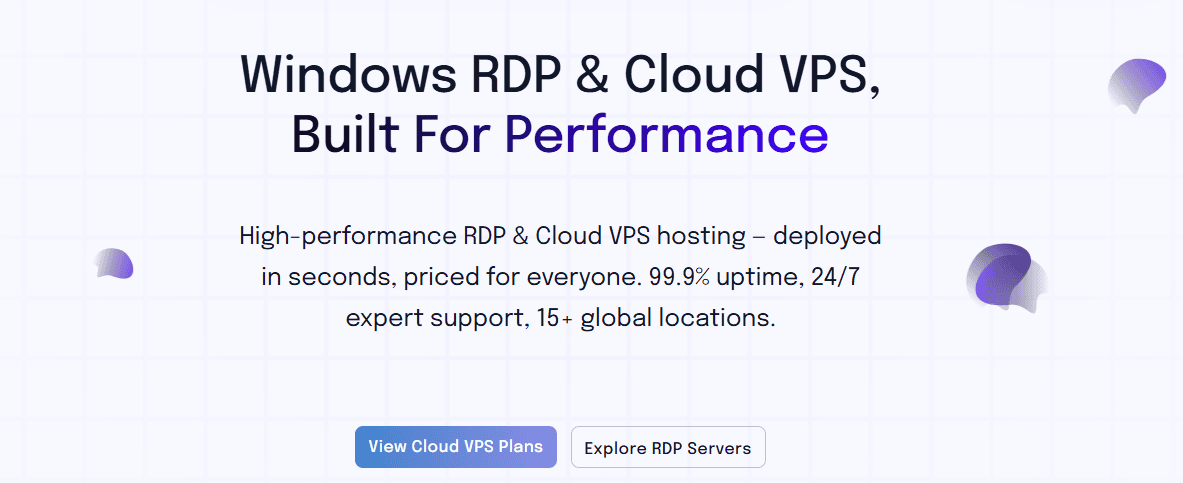
At its core, DigiRDP is designed for users who need a fast and stable remote desktop environment without the hassle of managing physical hardware. Whether you need a Windows server for automation tools, applications, managing remote work setups, or accessing a cloud-based desktop from anywhere, DigiRDP already provides a ready-to-use solution.
One of the DigiRDP standout features is its focus on instant deployment and full administrator and Root access. This means that once you purchase a plan, your server can be provisioned within minutes, giving you complete control over the environment to install software, configure settings, and manage resources just as you would on a local machine.
They offer several service categories, including Windows RDP Hosting for remote desktop access, Cloud VPS Hosting for websites, applications, and development environments, Dedicated Servers for heavier workloads and shared hosting for small businesses.
DigiRDP is suitable for workloads such as SEO tools, automation scripts, software testing, forex bots, remote business operations, and cloud-based development environments. The company also highlights support for multiple operating systems and one-click OS deployment, which makes setup and deployment fast and convenient.
DigiRDP Hosting Key Features
One thing I always look at before recommending any hosting provider is whether the features go beyond marketing noise to deliver improved performance. DigiRDP checks many of the boxes that developers, marketers, and power users care about.
Here are some of the standout features you get with DigiRDP.
- Full Admin and Root Access
This is one of DigiRDP’s biggest selling points. Unlike limited remote desktop services that lock down permissions, DigiRDP gives users full administrator access on its Windows RDP plans. With admin access, you can install any software or applications, modify Windows settings, manage firewall rules, create scheduled tasks, run automation tools and bots, configure custom services, restart system processes and update drivers and dependencies.
- Instant Server Activation
Nobody likes paying for hosting and then waiting hours for setup emails. DigiRDP provided near-instant activation, with most plans provisioned within minutes after payment confirmation.
- High-Performance AMD EPYC and Intel Xeon CPUs
DigiRDP uses AMD EPYC and Intel Xeon processors, which are enterprise-grade CPUs built for server workloads. RDP performance depends heavily on CPU consistency and clock speed, especially during long sessions, multitasking, or GUI-heavy workloads.
- NVMe / SSD Storage
DigiRDP understands that storage speed can make or break server responsiveness, and that’s why they offer SSD and NVMe-based storage across all their plans. NVMe storage is significantly faster than traditional SATA SSDs, especially for random read/write tasks.
- Multiple Global Server Locations
DigiRDP offers 15+ global server locations, including regions across the USA, Europe, and Asia. This is a big deal because location affects connection speed, ping, responsiveness, and click-to-screen delay. You have the right to choose a location close to your audience to enjoy instant response in your loading and give your audience a smoother experience.
- Unlimited Bandwidth
DigiRDP provides unlimited monthly bandwidth on all of its RDP plans. This means you can handle as much data transfer as needed, whether from website traffic, file uploads, or API requests, without having to worry about additional charges.
- Free Weekly Automated Backups
Backups are one of those things people tend to ignore until disaster knocks on the door. DigiRDP includes free weekly automated backups with every hosting plan, which is a strong trust signal for anyone running websites, applications, automation tools, or client projects. This means your server data is automatically copied at scheduled intervals, without requiring you to export files every week manually.
From a developer’s perspective, this is a major advantage. A single broken update, accidental deletion, or corrupted installation can quickly derail your day. Weekly backups provide a reliable safety net.
- Multiple Operating System Options
One thing I really value in hosting is flexibility, and DigiRDP performs well in this area. They support multiple operating system options, including both Windows and Linux distributions. The one-click OS setup feature also makes switching environments far easier than you can imagine.
DigiRDP Pricing and Plans
What I like about DigiRDP is that it does not box you into a one-size-fits-all setup. Whether you need a simple Windows RDP environment, a fully managed or unmanaged cloud VPS, or a dedicated machine with more horsepower, they offer multiple tiers designed around different workloads and budgets.
The pricing structure is fair enough to serve beginners, developers, remote workers, and businesses without forcing everyone into expensive plans right from the start.
Windows Admin RDP
The DigiRDP Windows Admin RDP plans start at $7.99 per month for the entry-level Admin RDP package and scale up depending on CPU cores, RAM, storage, and the type of IP environment you need. Their standard admin plans currently range from $7.99 to $89.99 monthly, with annual discounts available for long-term use.
These plans include full administrator access, giving you complete control over the Windows environment. You can install software, run automation tools, configure Windows services, and manage the machine as if it were sitting on your desk. The entry plan includes 1 CPU core, 1GB of RAM, 25GB of SSD/NVMe storage, and a dedicated IPv4 address, while higher tiers offer 6-core configurations with 32GB of RAM and 250GB SSD/NVMe. All the plans come with unmetered bandwidth.
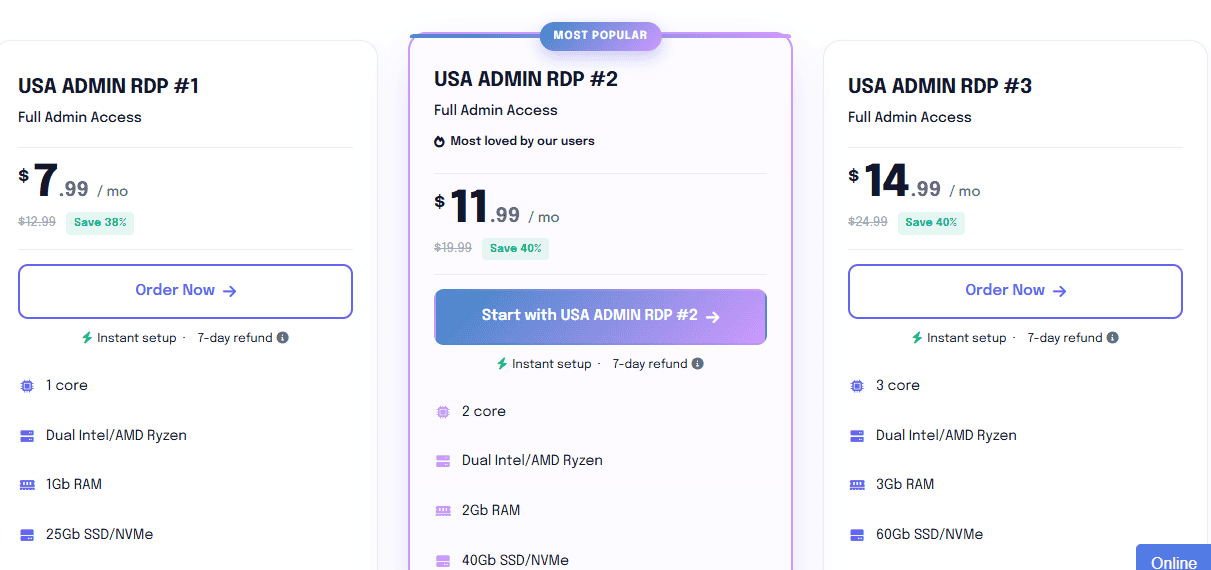
This kind of flexible pricing is useful for different use cases. A beginner running light software can start small, while power users can step up into more serious specs without switching providers.
Residential RDP
The DigiRDP Residential RDP plans are priced slightly higher, starting at $22.99 permonth and increasing to $41.99 per month, depending on the resources selected. This plan is built around a residential proxy IP environment, which sets it apart from the standard admin plans.
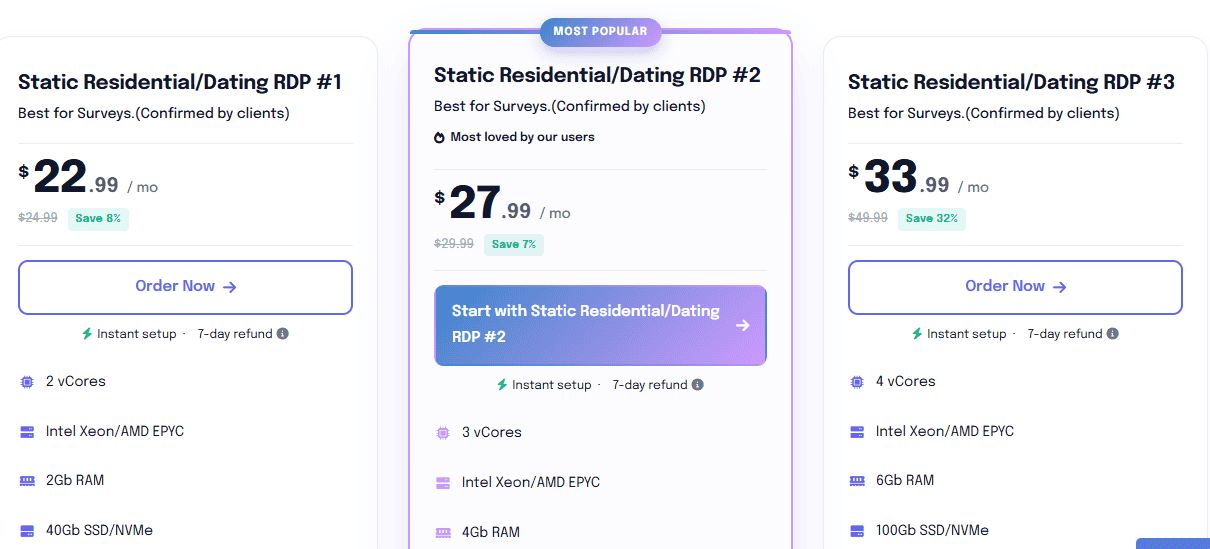
Instead of a regular data-centre IP, these plans include a residential-style IP setup, which some users prefer for browser-based workflows, survey platforms, remote account management, and applications where IP reputation matters more than raw specs.
Premium RDP
The DigiRDP Premium RDP tier is loaded with higher-end resource configurations within the Windows RDP line. These plans come with larger CPU allocations, more RAM, and higher SSD storage, making them better suited for users running multiple browser sessions, heavier automation workflows, or software that stays active 24/7.
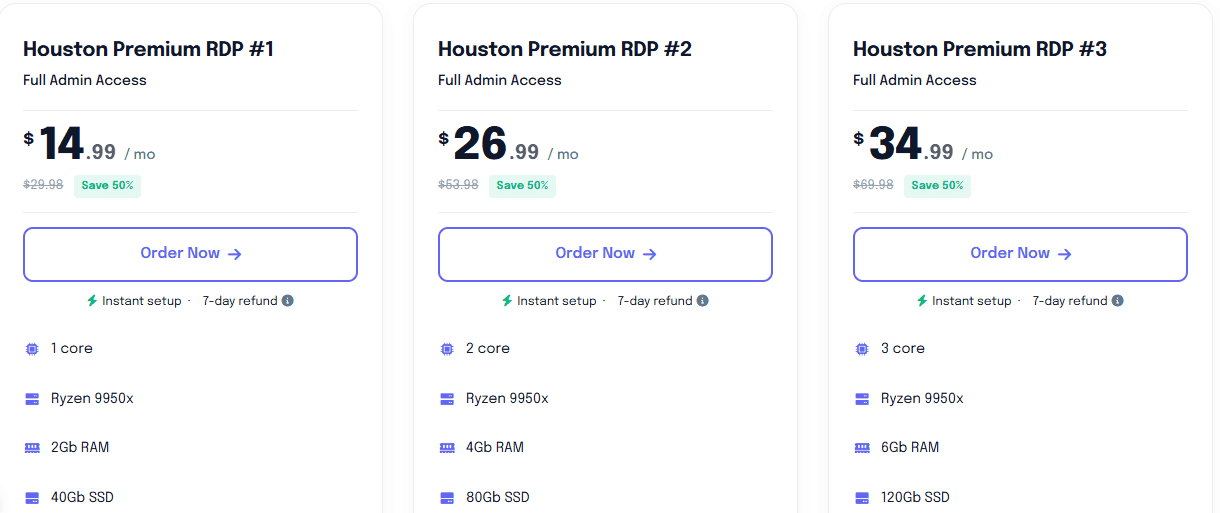
If your workflow involves multitasking or long-running background applications, this tier gives you more breathing room than the basic plans. The Premium RDP plan starts at $42.99 per month and goes up to $180 per month.
VPS Hosting
This is where DigiRDP starts appealing more to me. They offer Cloud VPS hosting in both fully managed and unmanaged plans, which is a smart pricing structure because it gives users a choice between convenience and control.
The fully managed VPS plans are ideal for users who want the server infrastructure without the headache of handling system administration themselves. With managed hosting, you don’t have to worry about server updates, security patches, monitoring, troubleshooting, backup support and performance optimisation. They will handle that for you. DigiRDP-managed VPS hosting starts at $8 with 1 vCore, Dual Intel/AMD Ryzen, 1GB DDR4 RAM, 15GB NVMe, 1TB Monthly and 1 dedicated IP4.
The unmanaged VPS plans, on the other hand, are built more for developers and experienced users. This gives you complete root-level access and freedom to configure the environment exactly how you want. It is a better fit for custom app deployments, staging environments, development stacks, and advanced server-side configurations.
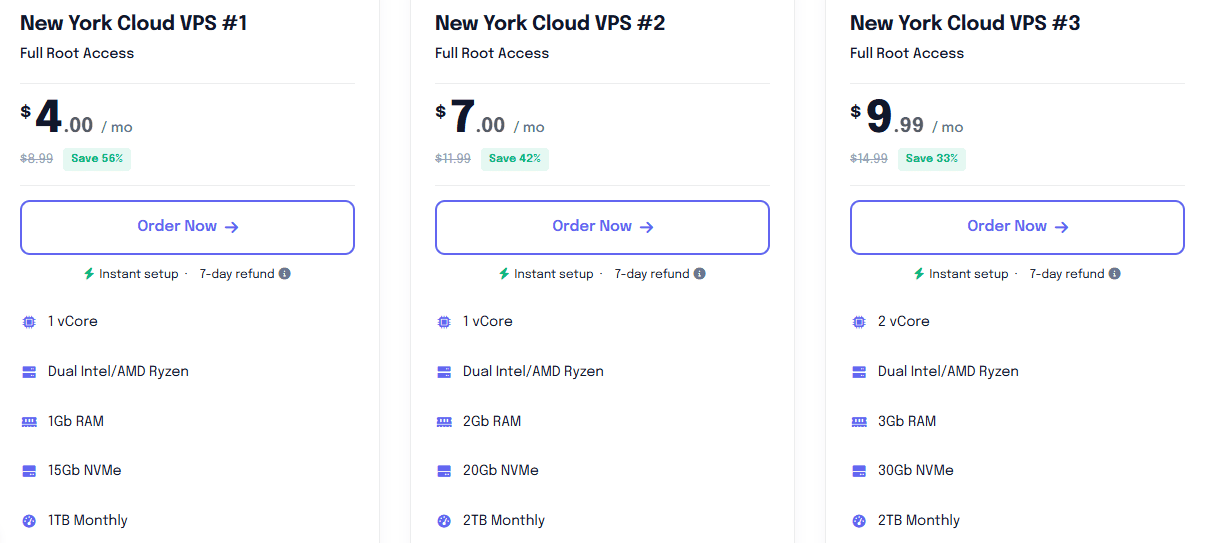
The DigiRDP unmanaged VPS hosting starts at $4 per month with 1 vCore, Dual Intel/AMD Ryzen, 1GB RAM, 15GB NVMe, 1TB Monthly and 1 IPV4 dedicated IP. As someone who works with servers regularly, I always prefer an unmanaged VPS because you get freedom to configure it your own way.
Dedicated Servers
If more raw power, performance, reliability, and value are your priorities. DigiRDP also offers dedicated server solutions. DigiRDP dedicated servers are built for heavier workloads where shared virtual resources may no longer be enough.
DigiRDP dedicated servers are designed for enterprise applications, large databases, high-traffic websites, large-scale automation, remote team environments, and multiple client projects that require full control and uncompromising performance at a lower price.
For just $84 per month, you can get DigiRDP’s entry-level dedicated server with Logical cores: 24 @ 3.08Ghz, Dual Intel Xeon X5650, 64Gb RAM, 1TB HDD, 1Gbps @50TB. The highest plan can be up to $229.00/ month, and you will enjoy logical cores: 32 @ 4.2Ghz, AMD Ryzen 3950X, 64Gb RAM, 1TB NVMe SSD, 1Gbps @50TB.
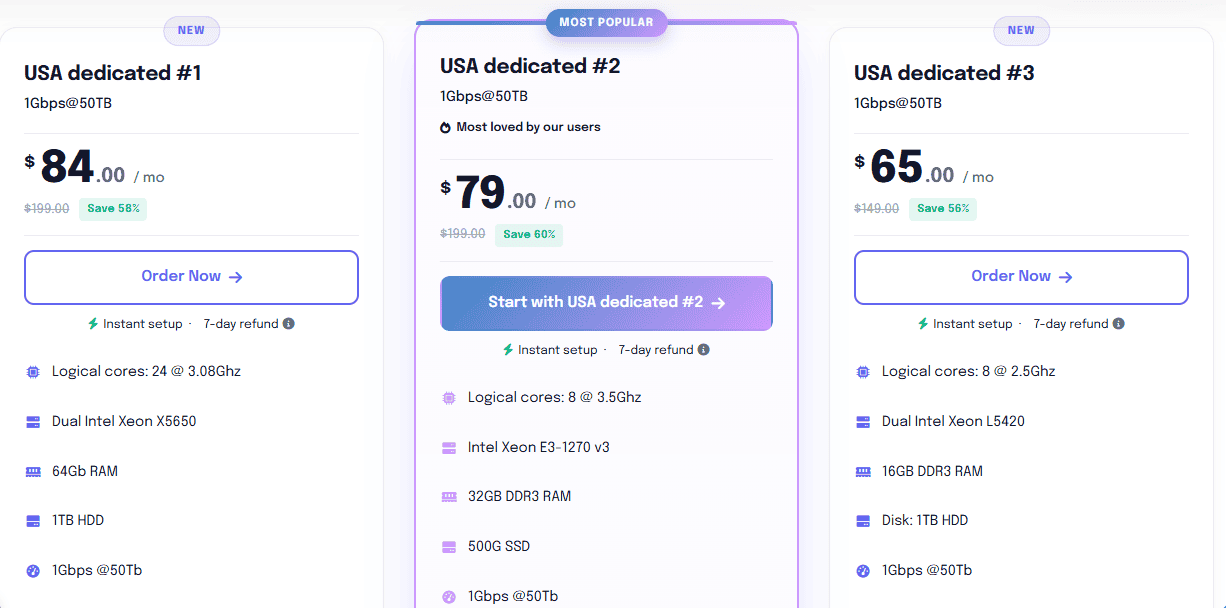
With a DigiRDP dedicated server, you will get root access and complete administrative control, which allows you to install any OS, configure firewalls, optimise kernel settings, and run custom applications with total freedom.
DigiRDP Uptime, Performance and Reliability Test
Most hosting providers almost always look impressive on their sales pages. The real question is what happens after you click Buy Now. To get the most out of this review, I needed to get my hands dirty, so I started by purchasing a live DigiRDP plan. I then created a live hosting environment on DigiRDP and monitored it for 15 days under real-world usage conditions.
My goal was to determine whether the performance, reliability, and support experience truly matched the promises made on the sales page. Rather than relying on a single benchmark, I wanted to see how the server behaved over time, under repeated requests, normal browsing activity, and short bursts of simulated traffic.
During the testing window, I focused on the three performance areas that matter most in day-to-day use: speed, uptime, and server response time. For the tests, I used Loader.io for traffic simulation, Google PageSpeed Insights for load performance and server response analysis, and UptimeRobot for continuous uptime monitoring.
Here is what I discovered during the test period.
- Speed
I ran speed checks several times a week to track whether the server maintained consistent performance beyond the first few days. For this part of the test, I paid close attention to two metrics: Time to First Byte (TTFB), which shows how quickly the server responds to an incoming request, and full page load time, which indicates how long it takes for the complete page to become usable.
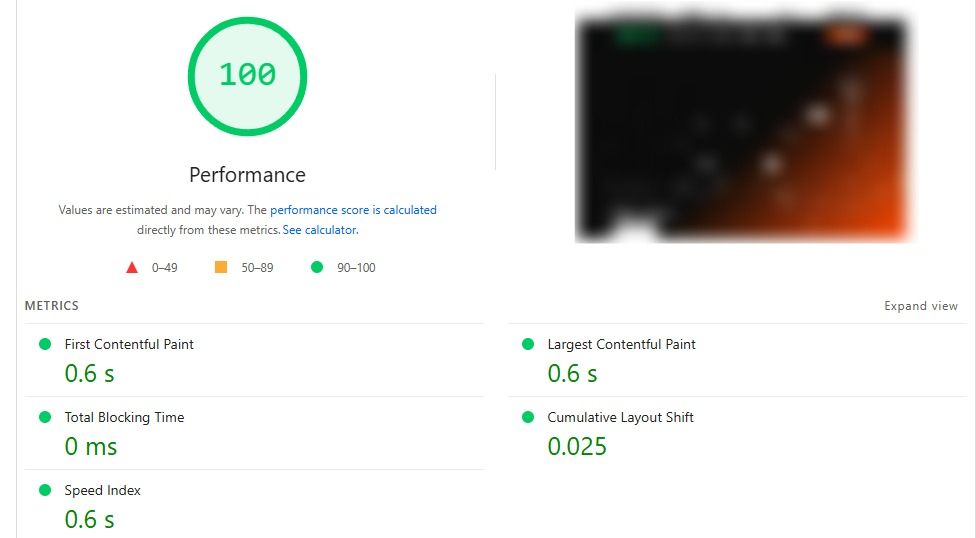
According to Google PageSpeed Insights, the server response times remained consistently fast even under a heavy traffic surge. The initial response time stayed stable, which is usually the first sign that the backend infrastructure is healthy. Page rendering and full load times also remained predictable across multiple test sessions.
What impressed me most was that the performance did not noticeably decline after several days of uptime. That matters because some hosting providers perform well on day one and then gradually slow down as processes build up or resources are silently throttled. That did not happen here.
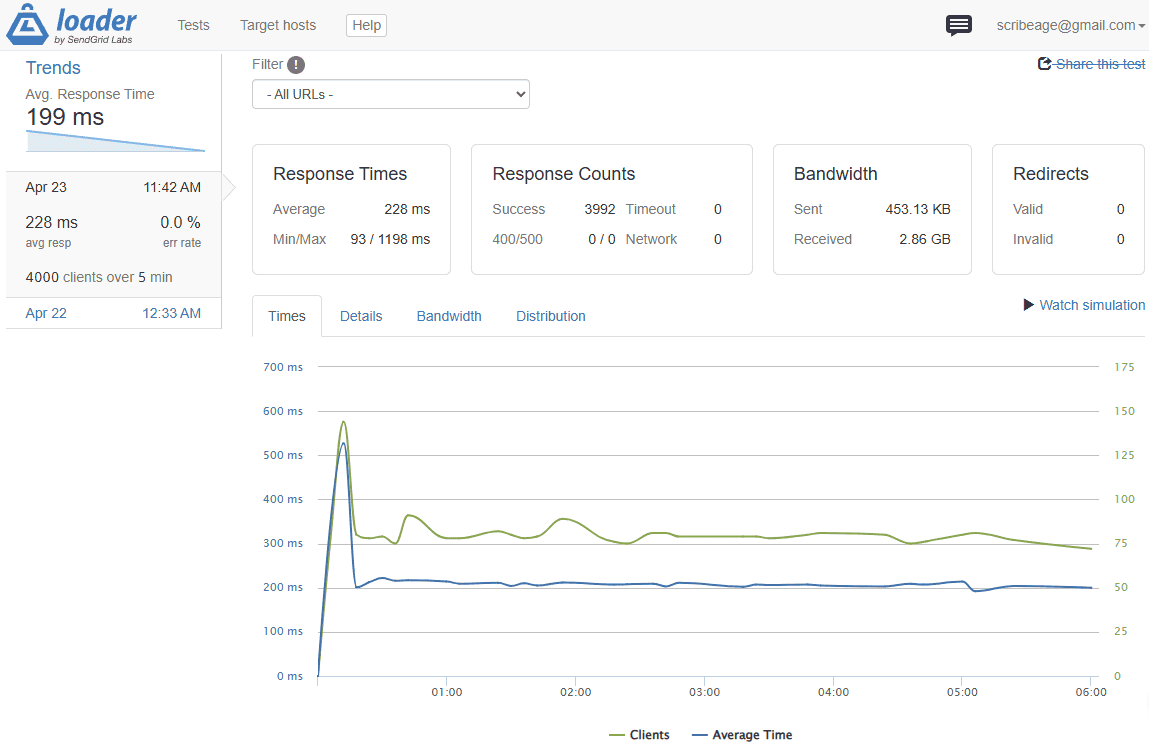
To move beyond ideal conditions, I used Loader.io to simulate 4,000 concurrent visitors hitting the website over five minutes. Under these traffic spikes, the page load time was 228 ms. The server remained responsive and did not crash, time out, or become unreachable during the test period. DigiRDP handled the pressure in a way that feels stable enough for business websites, blogs, landing pages, and web applications, regardless of the volume of traffic hitting the server.
- Uptime
For uptime testing, I connected the live deployment to UptimeRobot and allowed it to monitor the server continuously for the full 15-day review period.
I intentionally did not restart the server or manually interfere with the environment to observe how the hosting performs in a real production setup and if there would be an outage. Throughout the testing period, DigiRDP maintained 100% uptime, with no recorded outages or unexpected disconnects.
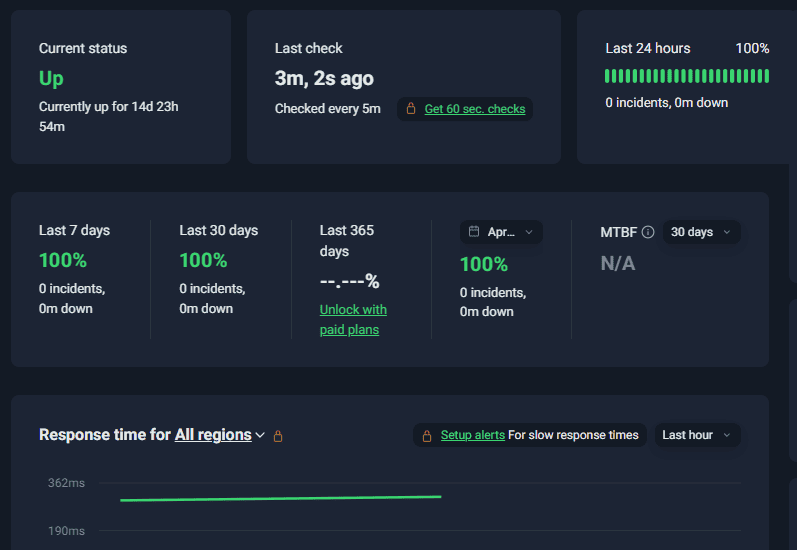
The site remained online for the entire period. That level of consistency is good for a website; it shows your website will remain available around the clock.
- Server Response Time
A server may appear fast during the first 24 hours, but the real test is how it performs after days or weeks of continuous uptime. During the 15-day test period, I monitored whether response times gradually increased, whether processes became sluggish, and whether resource limitations began affecting performance. During this period, the highest response time recorded was 321ms.
What stood out was the server response throughout the period. The responsiveness on day 13 felt very similar to what I experienced during the first week. There was no obvious performance drift, no unexplained latency spikes, and no signs of background throttling.
DigiRDP delivered stable servers that remained predictable even after weeks of continuous use. The speed remained consistent, uptime was flawless throughout the monitoring period, and the server continued to respond well even under a traffic spike.
Dashboard and Ease of Use
A hosting service can have great performance on paper, but if the dashboard feels clunky, confusing, or hides important tools behind layers of menus, it quickly becomes frustrating, especially for beginners. The DigiRDP dashboard is simple to use.
From the moment I logged in, the interface felt clean, easy to navigate, and well organised, even for someone using VPS or RDP hosting for the first time. The layout makes it easy to find important account and server information without any guesswork.
On the main dashboard, you can quickly view your account details, the number of active services, pending and paid invoices, and support tickets. This is useful because it keeps both the technical and billing sides of your hosting account in one place. You do not need to jump between multiple pages just to understand what services are active or whether a payment is due.
- Service Management and VPS Controls
From here, you can perform essential server actions such as changing your password, starting the VPS, rebooting it, stopping it, and powering it off completely. These are core management functions that every serious hosting dashboard should offer, and DigiRDP presents them in an easy-to-access manner.
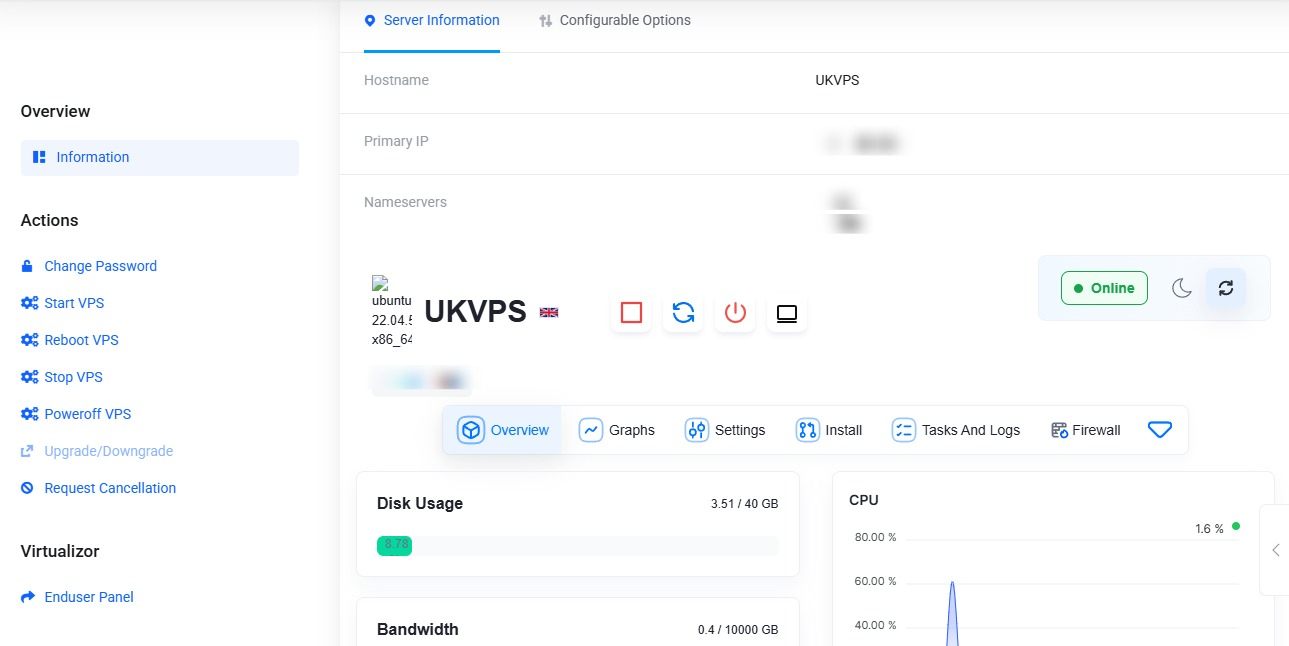
You can also upgrade or downgrade your plan, which is useful if your project outgrows its current resources or if you need to scale down to reduce costs.
- Resource Monitoring and Performance Stats
The service page provides a clear overview of important performance metrics, including disk usage, CPU utilisation, bandwidth statistics, and network speed.
This is valuable for developers, site owners, and anyone running applications that need resource awareness. From the dashboard, you can monitor CPU usage to quickly spot if a background process, plugin, or script is consuming more resources than expected.
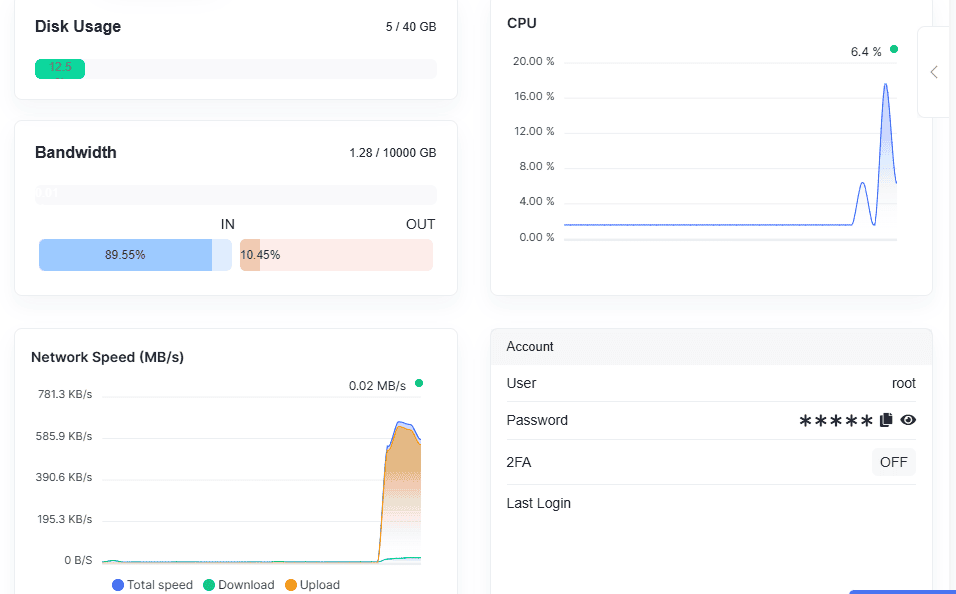
The bandwidth statistics also help users track traffic usage over time, which is useful for websites, file hosting, or applications with heavy visitor activity. The inclusion of network speed information adds another practical layer, giving users insight into throughput and connectivity performance.
- Reverse DNS, Tasks, and Logs
DigiRDP also includes access to Reverse DNS (rDNS) settings, which is a feature more advanced users will appreciate.
Reverse DNS is important for users who plan to use the server for email-related services, server identification, or reputation-sensitive applications. Having this accessible directly from the control panel is a strong plus.
The dashboard also provides task history and system logs, which can be incredibly useful for troubleshooting. If you reboot the server, change configurations, or run administrative actions, these logs help you trace what happened and when.
- Detailed System Statistics
DigiRDP also allows users to view detailed information, such as disk information, inode usage, and RAM statistics. Disk information helps you understand available and consumed storage space.
Inode information is useful for website owners running many files, such as WordPress sites with numerous plugins, uploads, and cached assets. Even if disk space appears available, inode limits can sometimes become the hidden bottleneck, so having visibility here is a smart choice.
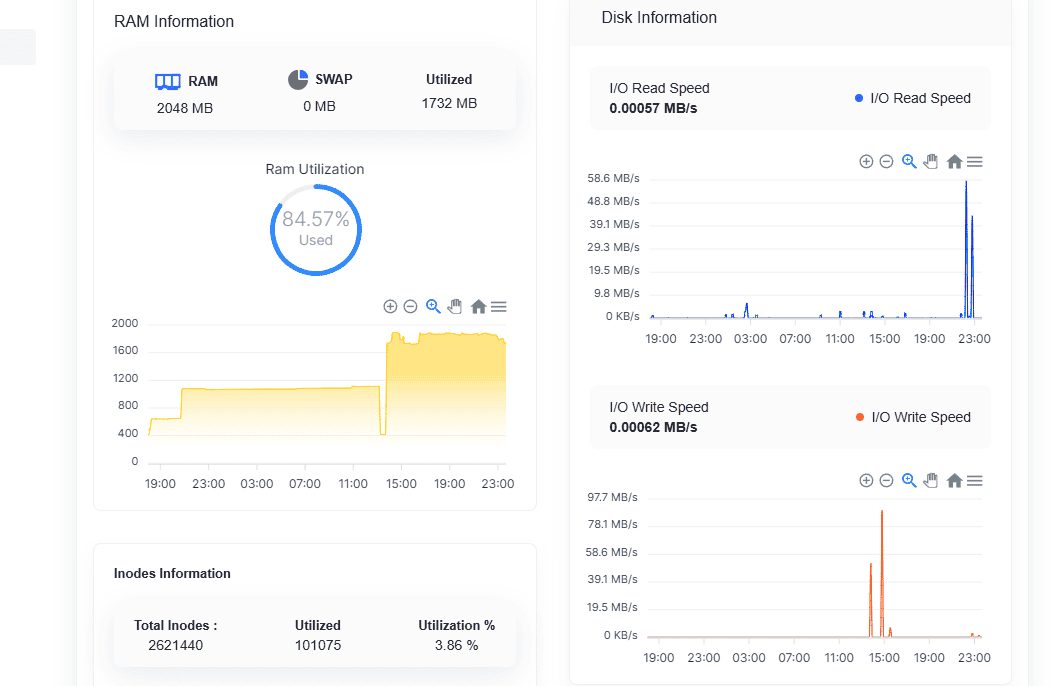
The RAM information panel helps monitor memory allocation and usage in real time, which is essential for performance tuning. If you are managing applications, databases, or automation tools, this kind of transparency makes optimisation much easier.
DigiRDP Pros and Cons
After testing DigiRDP for setup, performance, dashboard usability, and long-term reliability, I noted several strengths and a few limitations. No hosting provider is perfect, so I present both sides based on real-world use.
Pros
- Fast Setup Process
One of the first things that stood out was the fast setup process. The provisioning was quick, and the server credentials arrived without the long waiting period some providers are known for. DigiRDP has you covered if you need to deploy a project quickly or get an RDP environment up and running the same day.
- Pricing Structure
The plans are competitively priced across RDP, VPS, and dedicated servers, making them accessible to beginners, businesses, developers, and organisations seeking solid resources without exceeding their budgets. From entry-level Windows RDP to larger VPS plans, the pricing is fair for what is offered.
- Performance
Over the monitoring period, the service delivered stable speed, consistent uptime, and reliable server response times. Even under simulated traffic bursts using Loader.io, the hosted environment remained accessible and did not crash. That level of consistency is a strong sign that the backend infrastructure is dependable for everyday workloads.
- Full administrator and root access
For Windows RDP users, this means complete admin-level control over the environment, while VPS users get full root privileges. This flexibility is excellent for developers, technical users, and agencies that need full control over software installation, system configuration, and custom deployments.
- Free Weekly Automated Backup
Automated backup is one of those features that quietly adds significant value to a hosting provider. Having scheduled backups built into the service reduces the risk of data loss and offers an easy recovery point if something goes wrong after an update, accidental deletion, or a software issue.
- Multiple Global Data Centres
DigiRDP also benefits from multiple global data centres, which improves connection quality for users in different regions. The ability to choose a server location closer to your audience or work location can make a noticeable difference in latency and responsiveness.
- Unlimited Bandwidth
For RDP users, the inclusion of unlimited bandwidth on all plans is another strong advantage. This is useful for long sessions, remote work, large file transfers, and applications that stay connected for longer periods.
Cons
- Lack of bundled domain name services
If you are looking for an all-in-one hosting solution, you may need to purchase and manage your domain separately through a third-party registrar such as Namecheap. While this is not unusual for VPS-focused providers, it can be slightly inconvenient if you prefer everything under one roof.
- Limited IPv6 availability
From what I observed, most plans primarily come with IPv4 addresses, and IPv6 support is either absent or not clearly included across standard packages. As more networks and applications gradually adopt IPv6, this could be a consideration for advanced users or future-proof infrastructure planning.
- No Service Level Agreement (SLA)
While DigiRDP has strong uptime and a stable infrastructure, I did not find a formal SLA outlining guaranteed compensation terms or response commitments in the event of service interruptions. For businesses and agencies managing client workloads, a written SLA often adds an extra layer of confidence and accountability.
DigiRDP Customer Support
Customer support is often where hosting providers either build lasting trust or quickly lose it. A service may offer strong performance and competitive pricing, but when issues arise at odd hours, what matters most is being able to reach a real person who can actually help. This is one area where DigiRDP genuinely impressed me.
The DigiRDP support team is available through live chat and a ticketing system, allowing users to get quick help on urgent issues while also providing a more structured channel for technical requests that require follow-up. DigiRDP also offers a solid knowledge base filled with help articles, setup guides, and support documentation to help users get started with RDP and troubleshoot common problems.
What stood out most during my testing was the response speed. I contacted the support team several times, including during unusual hours when many providers would typically leave users waiting for automated or generic replies.
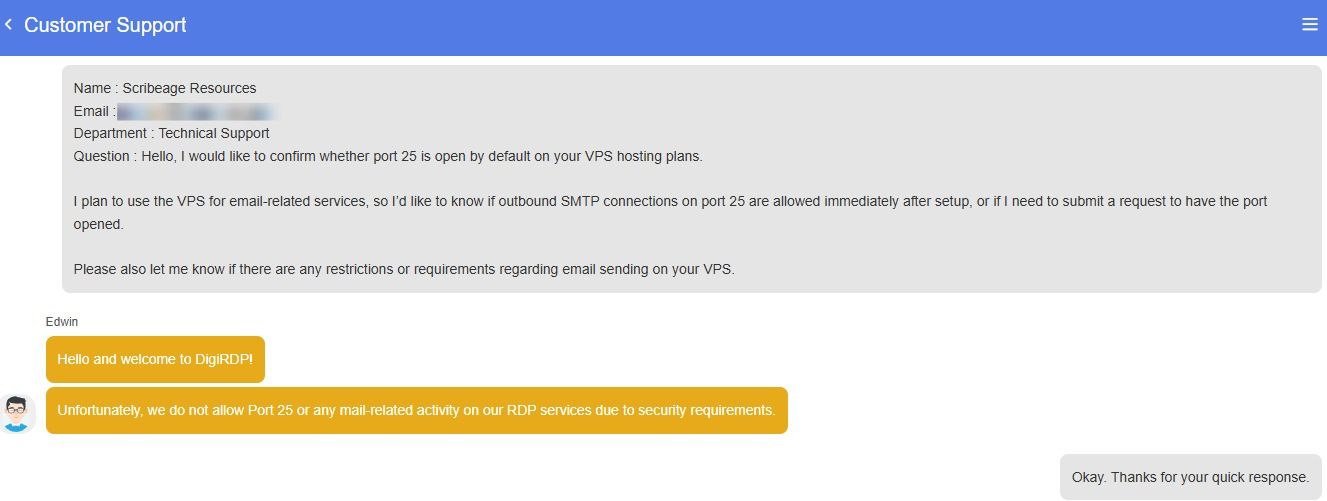
On one occasion, I asked whether port 25 is open by default or can be opened upon request for those of us who run self-hosted email applications. I received an immediate reply, along with a clear explanation of why they do not keep port 25 open.
Final Verdict
After spending time testing DigiRDP across setup, performance, uptime, dashboard usability, and customer support, I can confidently say this is a hosting provider that gets the fundamentals right. What stood out most during my hands-on use was how easy it was to get started. The setup was fast, the dashboard was simple enough for beginners to navigate, and the control options were detailed enough for developers and technical users who want more than just a basic hosting panel.
Over the 15-day testing period, I enjoyed stable uptime, consistent response times, and reliable speed under both normal use and short traffic bursts. That level of consistency is exactly what you want, whether you are hosting a business website, running a VPS environment, or using an RDP plan for remote work and heavy applications.
DigiRDP offers a strong balance of speed, reliability, control, and support at a competitive price point. If you need Windows RDP, cloud VPS hosting, shared hosting for smaller sites, or even dedicated resources, DigiRDP is a provider I would confidently recommend based on real-world use.
If you are looking for affordable, reliable RDP, VPS hosting or dedicated servers with fast support and stable uptime, DigiRDP is absolutely worth considering.





0 Comments