


Spam is the one guest that never knocks. One day, your site is quiet. Next, it’s plagued by fake signups, spam comments, bot-filled contact forms, and login abuse. Beyond the headache, spam slows down your site, erodes user trust, and can even drag your search rankings down.
I’ve been there.
One of my blogs was hit hard, up to 300 spam messages in a single day, through comments, contact forms, and registrations. Different links. Different bots. Same mess. I tested several anti-spam plugins. Some helped a little. None fixed the problem, and most added extra steps that annoyed real visitors.
That’s when I discovered CleanTalk. An automated spam protection service built to stop bots quietly in the background. No CAPTCHA boxes. No image puzzles. No “prove you’re human” interruptions. It filters spam before it ever reaches your site, working across platforms like WordPress, Joomla, Drupal, and even custom-built sites.
What stood out immediately was the cloud-based filtering. Once CleanTalk was active, the spam flood stopped. Comments became real. Contact form messages made sense. New registrations were from actual humans. The noise disappeared without changing the experience for visitors.
Today, that blog is still clean. No hourly spam attacks. No daily cleanup. Just normal site activity, the way it should be.
In this review, I’ll walk you through how CleanTalk works, what it does well, where it falls short, and who it makes sense for, and how to control SPAM on a website without driving your visitors crazy.
What is CleanTalk?
CleanTalk is a cloud-based spam protection service that helps website owners block unwanted bot activity without inconveniencing real users. Instead of forcing visitors to solve puzzles or tick checkboxes, it uses intelligent server-side filtering to detect and stop spam before it ever reaches your site. It eliminates the need for annoying CAPTCHA, math, questions, and answers.
CleanTalk sits between your site’s forms, such as comments, registrations, contact forms, login pages, and reviews, and the people attempting to submit them. It quietly analyses every submission and filters out anything that appears to be spam, automated bots, or malicious activity.
Unlike traditional CAPTCHA tools that interrupt genuine users with challenges, CleanTalk operates entirely in the background. Real visitors move smoothly through your forms, while bots are blocked invisibly.
CleanTalk integrates easily with platforms such as WordPress, WooCommerce, Joomla, Drupal, OpenCart, and custom PHP sites. It also includes features such as detailed spam logs and reports, an email reputation database, blacklist controls, and protection across multiple form types, including comments, registrations, contact forms, reviews, and orders.
CleanTalk allows real people to engage with your site naturally while eliminating fake accounts, automated spam, and bot attacks that clutter analytics and create unnecessary administrative work.
It’s very easy to set up and use, and it’s the cheapest anti-spam plugin on the market with a free seven-day trial. This plugin is simply Amazing!
The New CleanTalk Firewall
One feature that truly sets CleanTalk apart is its active spam firewall. This isn’t a tool that reacts after damage is done. It works upfront, stopping spambots before they ever touch your website.
Instead of waiting for spam to hit your comment section or contact form, the CleanTalk firewall blocks bad traffic at the HTTP level. It filters visitors as they arrive. If the request looks suspicious, it gets stopped at the door. This approach protects your site while simultaneously reducing unnecessary load on your server. It works like a security guard stationed outside your building, stopping trouble before it ever gets inside, rather than cleaning up messes afterwards.
The Spam Firewall provides a strong first layer of protection, making it difficult for bots to reach your pages at all. Behind it, CleanTalk Anti-Spam acts as a second line of defence. If anything manages to slip past the firewall, Anti-Spam immediately steps in to block fake comments, contact form spam, cart abuse, and fraudulent registrations.
If you run a blog or publish content regularly, this matters a lot. Spam bots don’t just leave junk comments; they crawl pages, waste resources, and create noise. The firewall prevents those bots from visiting your site in the first place, which keeps your content cleaner and your site faster.
Once the CleanTalk plugin is installed on WordPress, protection kicks in automatically. CleanTalk maintains a massive database with over 6 million known spam IP addresses. Every visitor’s IP address is checked against this list in real time. If a match is found, access is denied immediately. The bot never loads your page and is met with nothing more than a blank screen.
No alerts. No interruptions for real users. Just quiet, effective spam blocking that runs in the background and lets your website breathe again.
How CleanTalk Firewall Works
CleanTalk Firewall is designed to stop spam and malicious traffic before it ever reaches your website. Rather than reacting after bots submit forms or post junk comments, the firewall operates quietly at the entry point, filtering traffic in real-time. This early blocking helps keep your site fast, stable, and clean, without disrupting genuine visitors.
Here’s how the CleanTalk Firewall protects your website.
- Blocks Spam Bots Before They Reach Your Website
CleanTalk’s firewall stops most spambots at the HTTP/HTTPS request level. That means bad traffic is blocked before any page loads, scripts run, or forms appear. Bots don’t get the chance to load your pages, scan your content, submit spam forms or abuse login or registration pages.
- Reduces Server Load and Improves Performance
Many spambots fully load pages to submit spam. Each request hits your server, database, and PHP processes. Multiply that by hundreds or thousands of bot visits, and performance takes a hit. CleanTalk blocks these requests early, so your database stays calm, server resources aren’t wasted, and pages load faster for real users
- Protection Against HTTP and HTTPS Flood Attacks
CleanTalk Firewall helps defend against traffic-flood attacks that try to overwhelm your server with massive request volumes. While it’s not a full replacement for enterprise-level DDoS services, it does detect abnormal request patterns, block known malicious IPs and filter suspicious traffic spikes.
- Secures XML-RPC and Stops Brute Force Attacks
XML-RPC allows WordPress to communicate with apps and services, but it’s also a common target for attackers. Bots often use it to launch brute-force login attempts by sending thousands of username and password combinations. CleanTalk Firewall protects XML-RPC by filtering malicious XML-RPC requests, blocking known attacker IPs and preventing automated login abuse. This reduces the risk of unauthorised access, content changes, or database damage.
- Uses a Global Spam IP Reputation Database
Every visitor’s IP address is checked against CleanTalk’s constantly updated database of millions of known spam and bot IPs. If a match is found, access is denied immediately, no page loads, and no server resources are used while real visitors pass through without noticing anything.
- Detailed Spam Firewall Logs
CleanTalk includes a clear firewall log that shows blocked IP addresses, the type of threat detected, and the time and reason for blocking. This transparency allows you to see exactly how the firewall is working and confirms that spam is being stopped behind the scenes.
CleanTalk Key Features
Spam can slow down your site, frustrate real users, and even negatively impact your search rankings. CleanTalk addresses this issue proactively with a suite of powerful, invisible tools that block spam and malicious traffic before it reaches your website. From comments and contact forms to registrations, WooCommerce orders, and newsletter signups, it operates quietly in the background, keeping your site clean, fast, and secure, all without intrusive CAPTCHA challenges or interruptions for your visitors.
Here are some of CleanTalk’s key features:
- Comment Spam Protection
CleanTalk integrates seamlessly with WordPress native comments as well as popular comment plugins like wpDiscuz and Jetpack Comments. It can move spam comments to a dedicated SPAM folder or silently block them, depending on your settings. You can also enable automatic deletion of spam comments. The plugin scans existing comments and users, validates email addresses in real time, and allows you to quickly manage and clean up spam directly from your WordPress dashboard.
- Spam Bot Registration Filter
CleanTalk protects all registration forms, including WordPress native forms and popular plugins, such as Fluentforms, BuddyPress, bbPress, S2Member, Formidable Forms, WooCommerce, ProfilePress, Registration Magic, and many more. It prevents bots from creating fake accounts and keeps your database clean.
- Contact Form Spam Protection
From day one, CleanTalk shields your contact forms from spam. It integrates directly with top plugins, such as Fluent Forms, Formidable Forms, Forminator, Contact Form 7, JetPack Contact Form, Fast Secure Contact Form, Ninja Forms, Gravity Forms, and even custom-built or theme-based forms. Spam emails are blocked without affecting the frontend or user experience.
- WooCommerce Spam Protection
CleanTalk stops spam in WooCommerce by filtering fake orders, spam comments, bogus reviews, fake registrations, contact form abuse, and subscriptions. This ensures your online store stays professional, secure, and trustworthy for real customers.
- Newsletter and Subscription Form Protection
CleanTalk protects newsletter subscriptions and signup forms from spam bots. It works seamlessly with MailPoet, MailerLite, PopupAlly, Thrive Leads, Ninja Popups, and most other newsletter plugins to ensure only legitimate emails reach your mailing lists.
- Invisible Spam Protection
All protection occurs silently in the background. Users are never interrupted by CAPTCHA challenges, puzzles, math questions, or quizzes. The plugin detects spam bots invisibly, allowing real users to interact with your site naturally and without disruption.
- Compatibility with WordPress Cache Plugins
CleanTalk integrates smoothly with all major caching solutions, including W3 Total Cache, WP Rocket, Quick Cache, WP Fastest Cache, Hyper Cache, WP Super Cache, and others. No conflicts. No slowdowns.
- Advanced Firewall and DDoS Protection
CleanTalk includes an active spam firewall that blocks bots at the HTTP/HTTPS level before they hit your site. This reduces server load and protects against DDoS floods, XML-RPC attacks, brute-force login attempts, and SQL injection attempts.
- Detailed Spam Logs and Reporting
All activity is logged for transparency. You can view blocked IPs, types of spam attacks, and timestamps, so you always know exactly how CleanTalk is protecting your site.
- Customizable Settings for Maximum Control
CleanTalk allows you to adjust settings to your needs, silently block spam, automatically delete spam, or just monitor activity. You remain in full control while the plugin works quietly in the background.
Setting up CleanTalk Plugin
Installing and setting up the CleanTalk plugin on your WordPress website is very easy; with a few clicks here and there, you are done installing CleanTalk on your website.
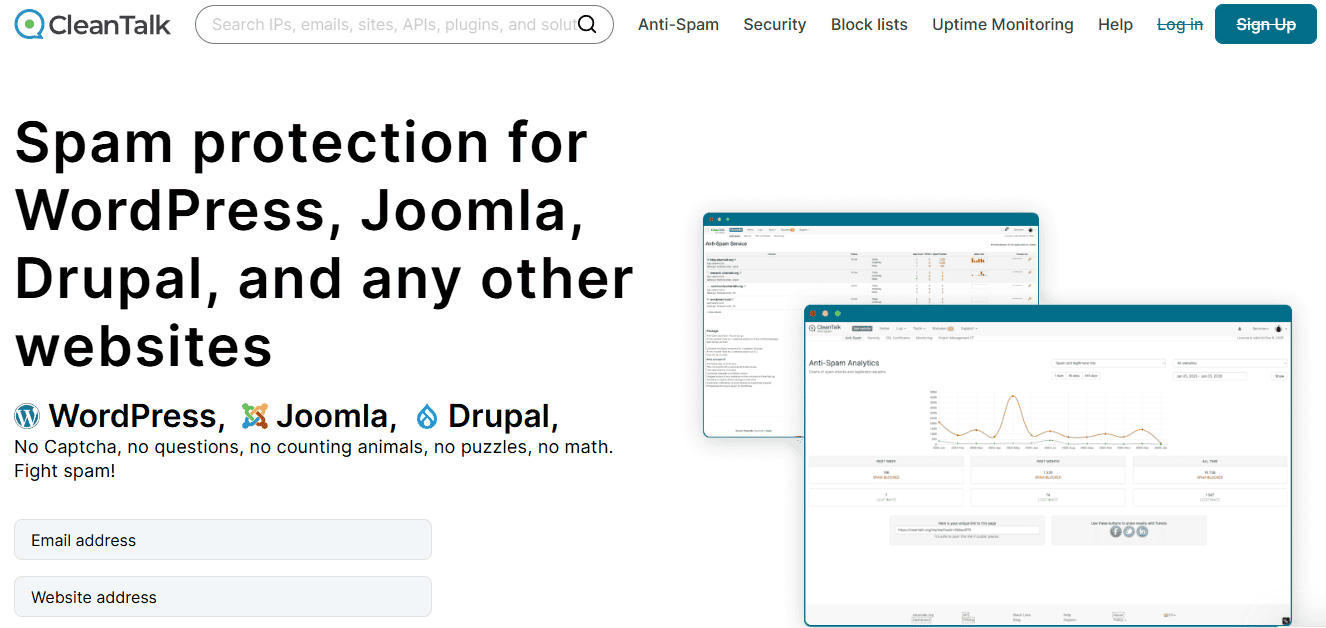
The first step in setting up CleanTalk is to visit the Official Website. You need to enter your email and website address and hit the “create account” button, as seen in the image below. Then it will reveal the access key; copy the access key somewhere safe, you will need it to activate the plugin.
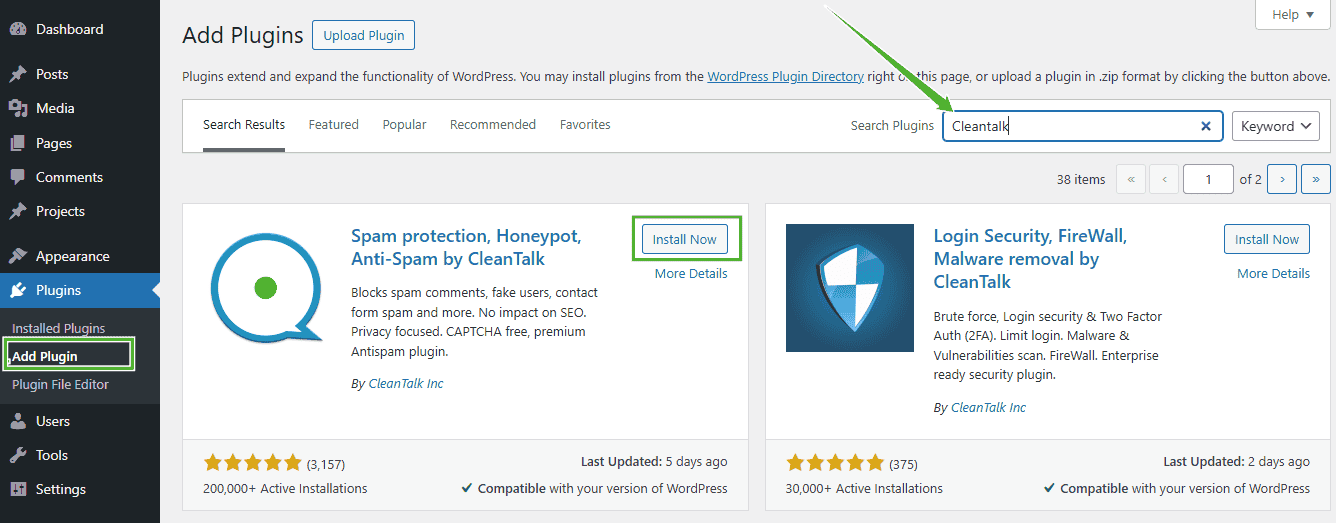
To install CleanTalk on your WordPress site, navigate to your WordPress dashboard. In the Admin Panel, go to the Plugins section and click Add New. Search for the plugin by typing “ CleanTalk”. Once you find it, click Install Now and then Activate to enable the plugin on your site.
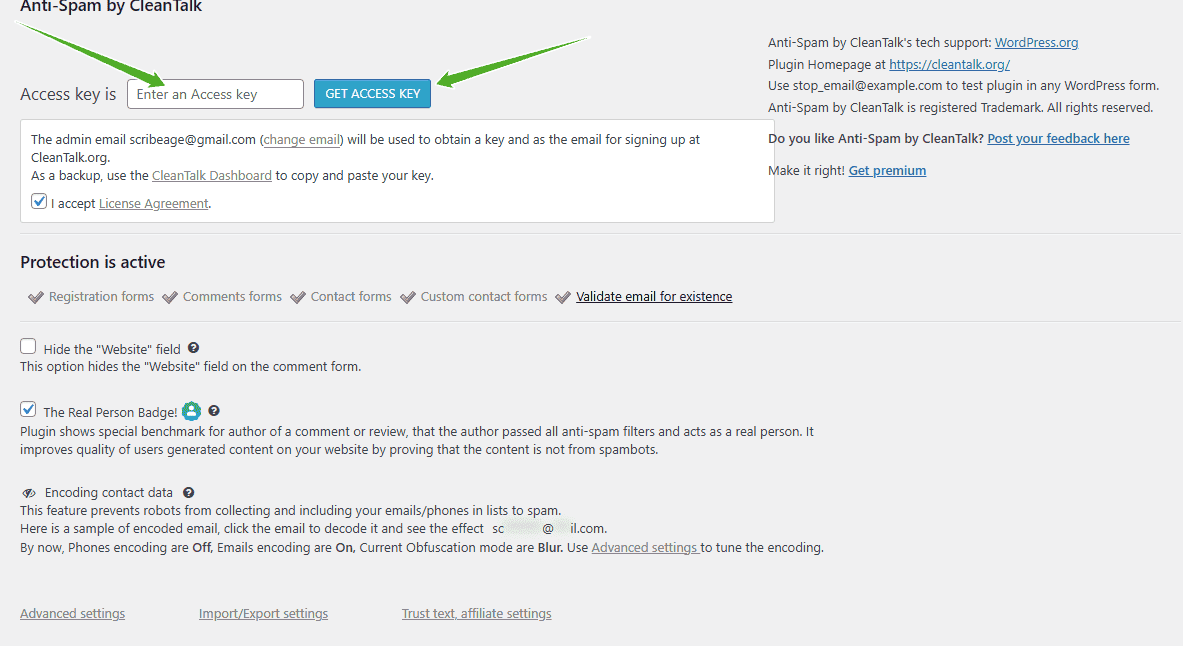
As soon as you activate the plugin, you will be taken to the page to input the access key you copied the other time. Copy the access key from your CleanTalk Control Panel and paste it into the "Access key" field, set up the plugin if necessary and press the "Save Changes."
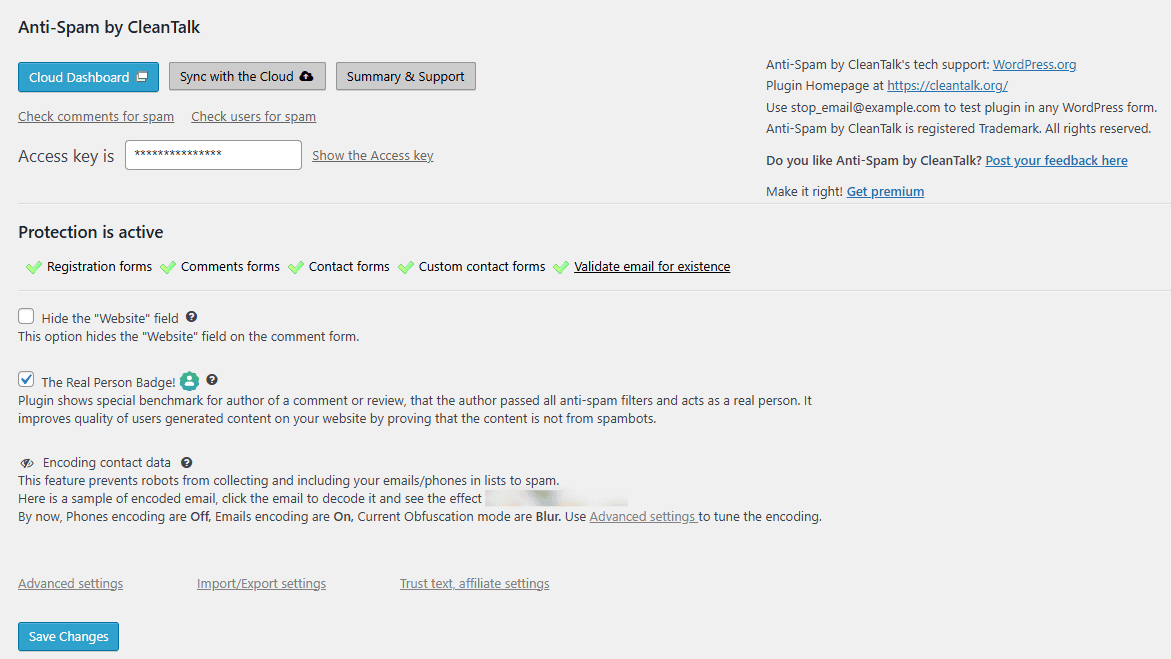
Once the access key is activated, the settings page will change, and you will see “Protection is active” written in bold text with a couple of green checkmarks across the page. These checkmarks indicate what the plugin is protecting on your website.
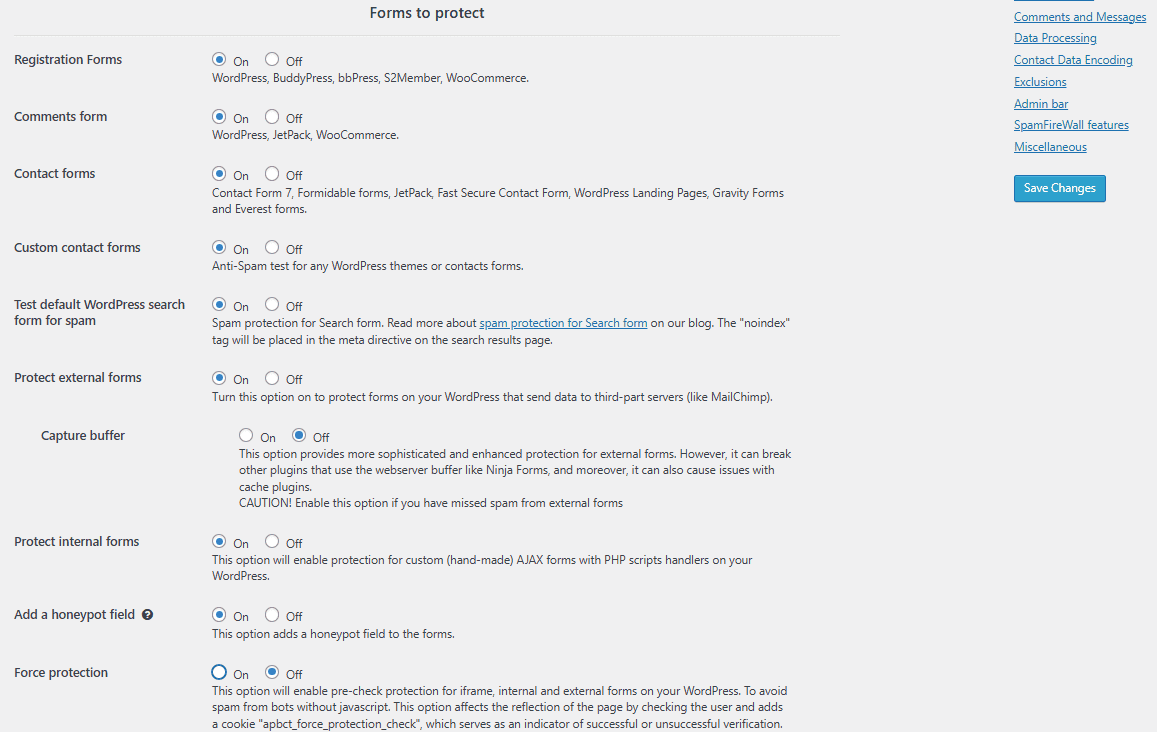
Next, configure the plugin according to your needs. In the plugin, click Advanced Settings, and select the areas of your website you want CleanTalk to protect. Options include registration forms, comment forms, contact forms, search forms, external forms, internal forms, and custom forms.
You can toggle protection for each form type on or off through the settings. The configuration is straightforward and intuitive; simply adjust the options to secure your site according to your preferences.
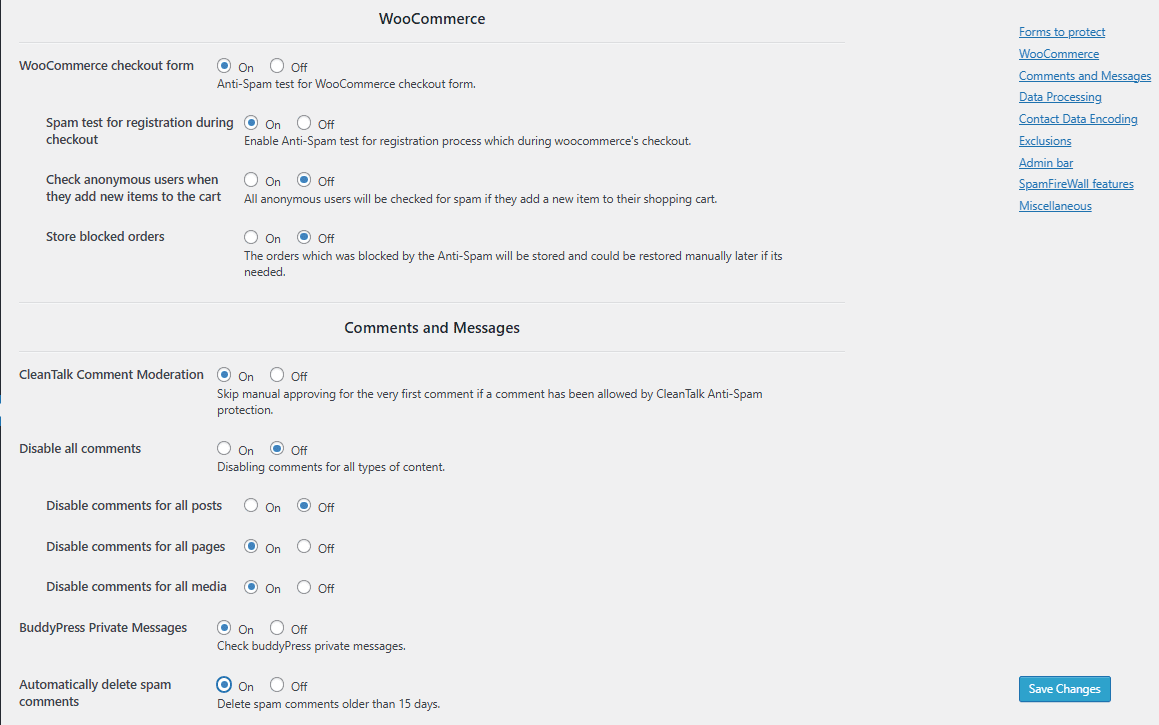
Next, navigate to the WooCommerce, Comments, and Messages section to enable your preferences. Here, you can configure protection for your WooCommerce store, comment sections, and messages you receive.
Once the plugin is installed and active on your site, you can monitor statistics on your CleanTalk dashboard. Here, you can view a real-time graph showing spam comments blocked and legitimate comments allowed.
The dashboard also provides access to logs and entries, including blocked IPs and email addresses. You can remove email addresses that are genuine and not spam, and for each email removed, one extra day is credited to your plan.
Additionally, you can blacklist any IP address identified as a spammer by adding it to the CleanTalk directory to protect all users of CleanTalk services.
CleanTalk Pricing Plans
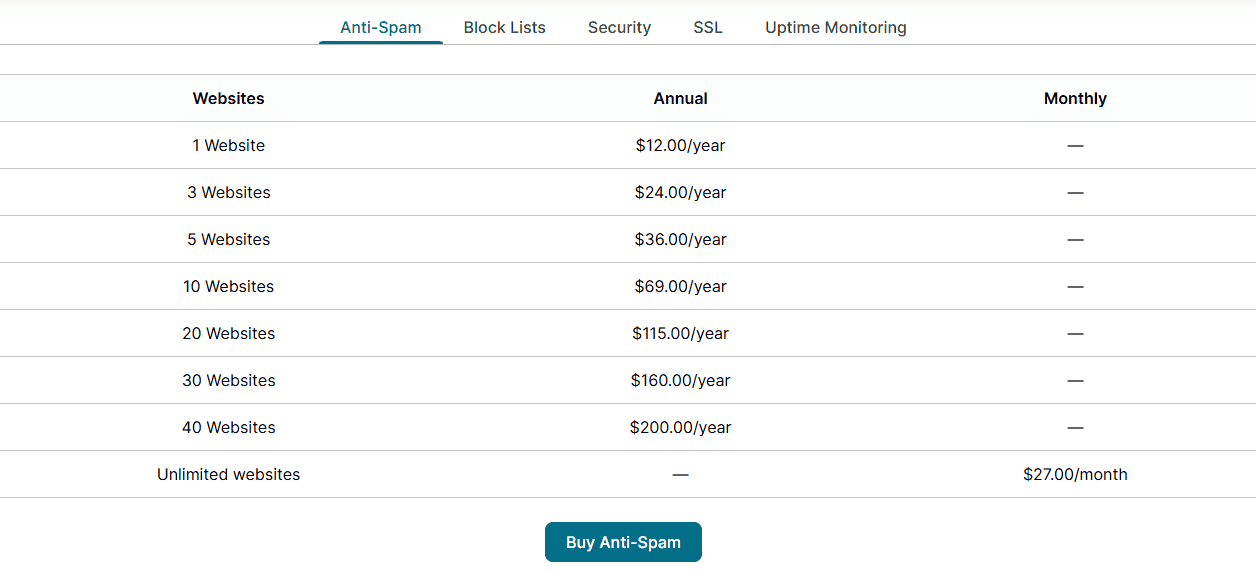
With its extensive features, benefits, and advanced spam protection technology, CleanTalk remains surprisingly affordable. A single website plan costs just $12 per year, which is a dollar per month to protect your website from SPAM. The largest plan, covering up to 40 websites, is $200 per year, while unlimited website usage is available for $27 per month.
Every plan includes all features, 24/7 technical support, regular updates, and mobile apps for a year. Plans can be renewed, upgraded, or cancelled at any time. You can also try CleanTalk free for 7 days to experience how effectively it protects your website from spam. Each package offers a 7-day free trial to test its spam protection capabilities on your blog.
Final Thoughts
Spam doesn’t just clutter your website; it can damage your reputation, frustrate readers, and even impact your sales and business growth. Protecting your site shouldn’t come at the cost of annoying your visitors with CAPTCHA, puzzles, or math questions. That’s where CleanTalk shines. This hidden gem works quietly in the background, keeping spam at bay so you can focus on growing your blog, engaging your audience, and boosting revenue.
I’ve tried multiple anti-spam plugins over the years, but none perform as well as CleanTalk. It’s a plugin that truly walks the talk. Whether your site has blog posts, contact forms, registration forms, WooCommerce orders, or newsletter subscriptions, CleanTalk stops spam bots in their tracks, without overloading your server or disrupting the user experience.
If your blog or website is constantly under attack from spam, it’s time to give CleanTalk a chance. Install it, and forget about spam for good. With its powerful firewall, real-time IP checks, and seamless integration with WordPress, it’s a must-have tool for any site owner who values security, performance, and peace of mind.
The free seven-day trial is more than enough to see its effectiveness. After that, at just $12 per year, you can enjoy spam-free content and double-layered protection without paying for additional tools.
Frequently Asked Questions (FAQs)
What is Anti-Spam by CleanTalk?
How effective is CleanTalk?
Registrations – 0.007%
Comments – 0.001%
Contact forms – 0.001%
Orders (WooCommerce) – 0.008%
The statistic was calculated on November 10, 2017, for 1 million requests.
What Can I Use Instead of Akismet Anti-Spam?
How Does CleanTalk Protect My Website from Bots and Spam?
IP Reputation Checks
Behavior Analysis
Spam Activity Database
Content Analysis
All of this happens automatically, with no user interaction needed.





0 Comments